Software comparison
Geomagic Wrap vs Geomagic Design X
Both Geomagic programs start from the same scan data. Wrap turns it into a clean mesh or a surface model that follows the shape; Design X turns it into feature-based CAD whose dimensions you can change. The deliverable decides.
Key takeaways
- Wrap builds watertight meshes and NURBS surfaces or solids that follow the scanned shape; Design X builds feature-based solids on a parametric history tree.
- For editable, feature-based CAD with a history tree, the maker points to Design X; Wrap is the one it describes for complex, organic shapes.
- Wrap edits color texture, engraves lettering and unrolls cylindrical scans; Design X sorts a mesh into region groups and fits exact features.
- Wrap exports to 3D printing, FEA, CFD and animation tools; LiveTransfer in Design X feeds five CAD systems.
- Both read scan data from any device, and both use the same maker's workstation figures.
Which should you choose: Geomagic Wrap or Geomagic Design X?
Choose Geomagic Wrap when the shape itself is what you hand over: a watertight mesh for printing, a textured model for heritage or animation, or exact NURBS patches over a sculpted, anatomical or styled form, with control of their layout and continuity. Choose Geomagic Design X when someone will edit the model later: it rebuilds the scan as feature-based solids on a parametric history tree, turns holes and faces into exact features, and sends the tree to SOLIDWORKS, NX, Creo, AutoCAD or Inventor. Both read the same scan data and run on the same Windows workstation, so a team with both kinds of work can use the two side by side.
Choose Geomagic Wrap if…
- You deliver the shape itself: a print, an archive model, an animation asset or a surface model.
- Your subjects are sculptures, anatomy, dental models or styled products.
- You need color texture kept, edited or painted.
- You engrave lettering onto scans or unroll tires and pipes.
Choose Geomagic Design X if…
- Engineers will change dimensions after the scan becomes CAD.
- Your parts mix holes and machined faces with cast or molded areas.
- The model must arrive in SOLIDWORKS, NX, Creo, AutoCAD or Inventor with its history.
- You rebuild legacy, aftermarket or custom parts.
How do Wrap and Design X differ, row by row?
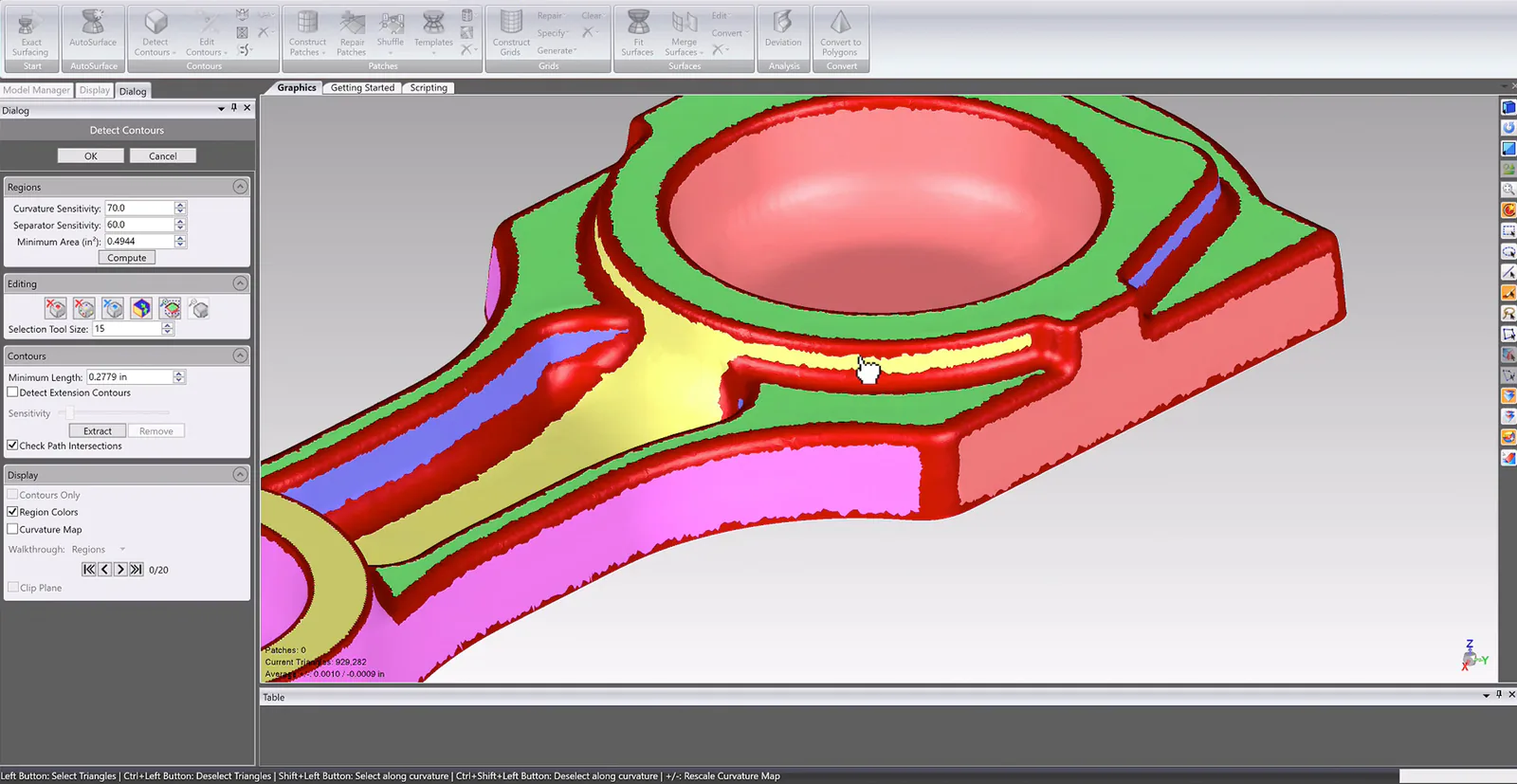
Start with the rows for what each program builds and for the feature tree: they hold the whole difference. Wrap's output follows the scanned shape as a mesh or as NURBS patches, and for an editable history tree its maker points to Design X. Design X's output is a set of features built from regions, sketches and surfaces, which LiveTransfer carries into your CAD system. The rows on surfacing, mesh repair and other tools show how much the two overlap, since both clean meshes and both fit surfaces. The last rows show where each result goes and the workstation both share.
| Specification | Geomagic Wrap | Geomagic Design X |
|---|---|---|
| What it does | Point cloud, mesh and surfacing software for 3D scan data | Reverse engineering software that turns 3D scans into editable CAD |
| Scan data it takes | Drive a scanner directly in Wrap, or bring in raw scan data from any device | Data from any scanner; Direct scanner and probe integration (Design X Plus, Design X Pro) |
| What it builds | Watertight polygon models; exact NURBS surfaces or solids that CAD software can use | Feature-based, editable CAD models; builds solids with a parametric history tree |
| Surfacing | Auto and Exact Surfacing; NURBS surfaces with control of patch layout and continuity | Auto-surfacing with selective surfacing (Design X Plus, Design X Pro); Exact Surfacing (Design X Pro) |
| Feature tree | For editable, feature-based CAD with a history tree, the maker points to Geomagic Design X | LiveTransfer sends the complete feature tree, or single features |
| Mesh repair | Remesh, hole filling, smoothing, patching, watertight models, curve and hard-feature extraction | The Healing Wizard repairs folded, crossing and dangling triangles |
| Other tools | Texture editing, engraving, unrolling, scripting and macros | Guided and automated wizards (Design X Pro); Auto Sketch (Design X Pro); CAD Correction (Design X Pro) |
| Where the result goes next | FEA and CFD models; animation tools such as Maya and 3ds Max | SOLIDWORKS, NX, Creo, AutoCAD, Inventor |
| Current version | 2024.3.2 | 2026.1.0 |
| Operating system | Minimum Windows 10 64-bit or later; recommended Windows 11 64-bit | Minimum Windows 10 64-bit or later; recommended Windows 11 64-bit |
Geomagic Wrap vs Geomagic Design X: side by side
What it does
- Geomagic Wrap
- Point cloud, mesh and surfacing software for 3D scan data
- Geomagic Design X
- Reverse engineering software that turns 3D scans into editable CAD
Scan data it takes
- Geomagic Wrap
- Drive a scanner directly in Wrap, or bring in raw scan data from any device
- Geomagic Design X
- Data from any scanner; Direct scanner and probe integration (Design X Plus, Design X Pro)
What it builds
- Geomagic Wrap
- Watertight polygon models; exact NURBS surfaces or solids that CAD software can use
- Geomagic Design X
- Feature-based, editable CAD models; builds solids with a parametric history tree
Surfacing
- Geomagic Wrap
- Auto and Exact Surfacing; NURBS surfaces with control of patch layout and continuity
- Geomagic Design X
- Auto-surfacing with selective surfacing (Design X Plus, Design X Pro); Exact Surfacing (Design X Pro)
Feature tree
- Geomagic Wrap
- For editable, feature-based CAD with a history tree, the maker points to Geomagic Design X
- Geomagic Design X
- LiveTransfer sends the complete feature tree, or single features
Mesh repair
- Geomagic Wrap
- Remesh, hole filling, smoothing, patching, watertight models, curve and hard-feature extraction
- Geomagic Design X
- The Healing Wizard repairs folded, crossing and dangling triangles
Other tools
- Geomagic Wrap
- Texture editing, engraving, unrolling, scripting and macros
- Geomagic Design X
- Guided and automated wizards (Design X Pro); Auto Sketch (Design X Pro); CAD Correction (Design X Pro)
Where the result goes next
- Geomagic Wrap
- FEA and CFD models; animation tools such as Maya and 3ds Max
- Geomagic Design X
- SOLIDWORKS, NX, Creo, AutoCAD, Inventor
Current version
- Geomagic Wrap
- 2024.3.2
- Geomagic Design X
- 2026.1.0
Operating system
- Geomagic Wrap
- Minimum Windows 10 64-bit or later; recommended Windows 11 64-bit
- Geomagic Design X
- Minimum Windows 10 64-bit or later; recommended Windows 11 64-bit
Specs checked:
What does each program do to a scanned shape?
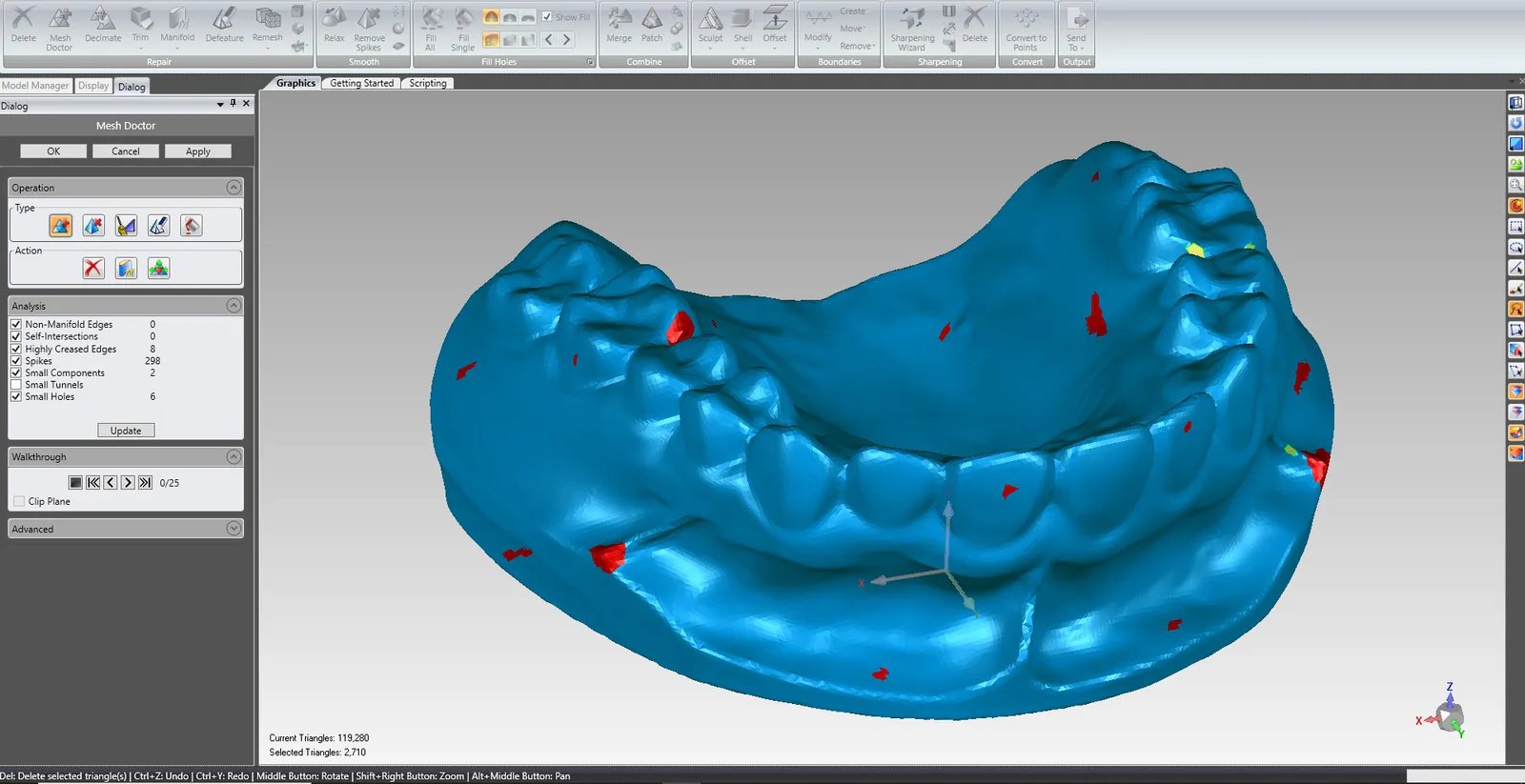
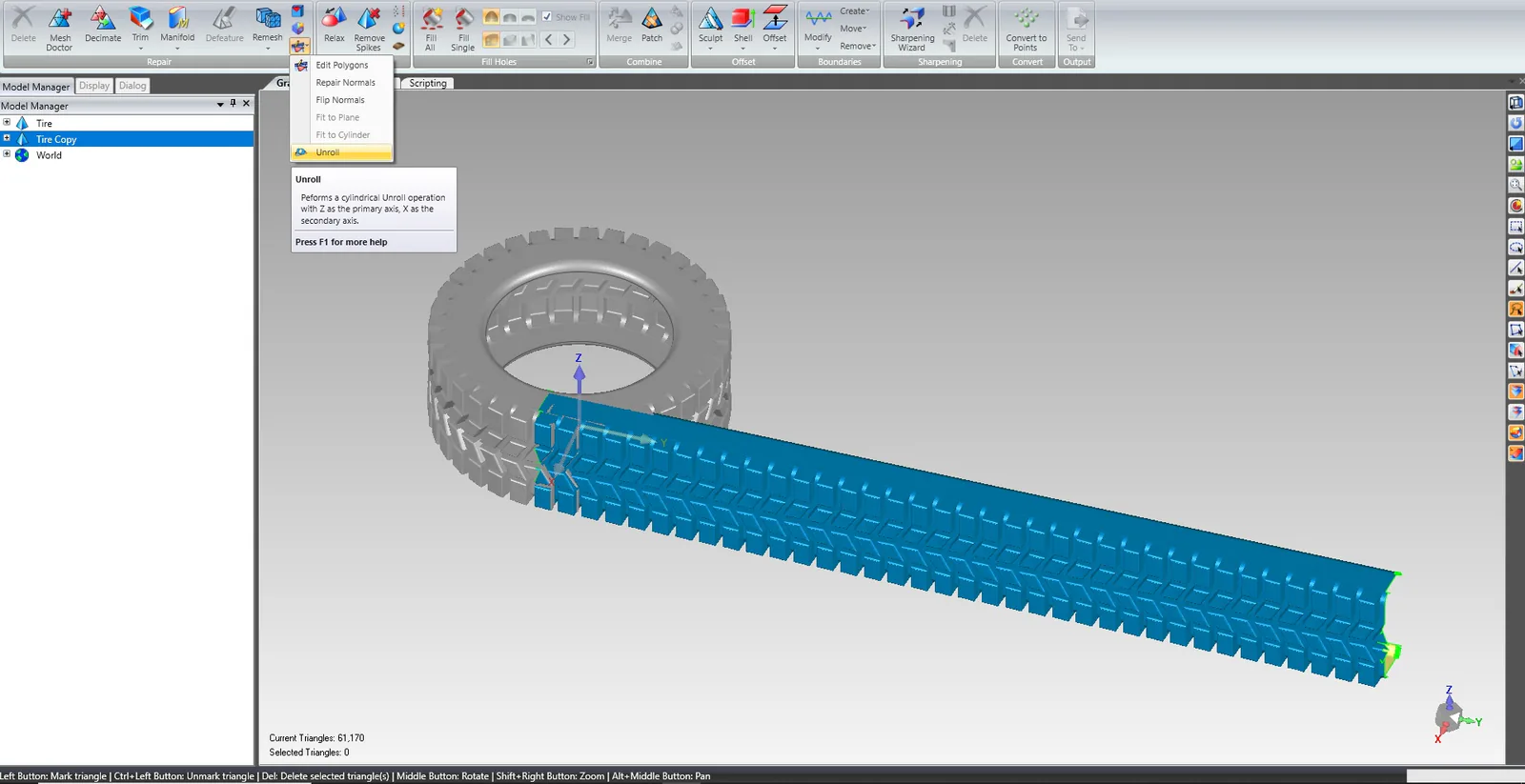
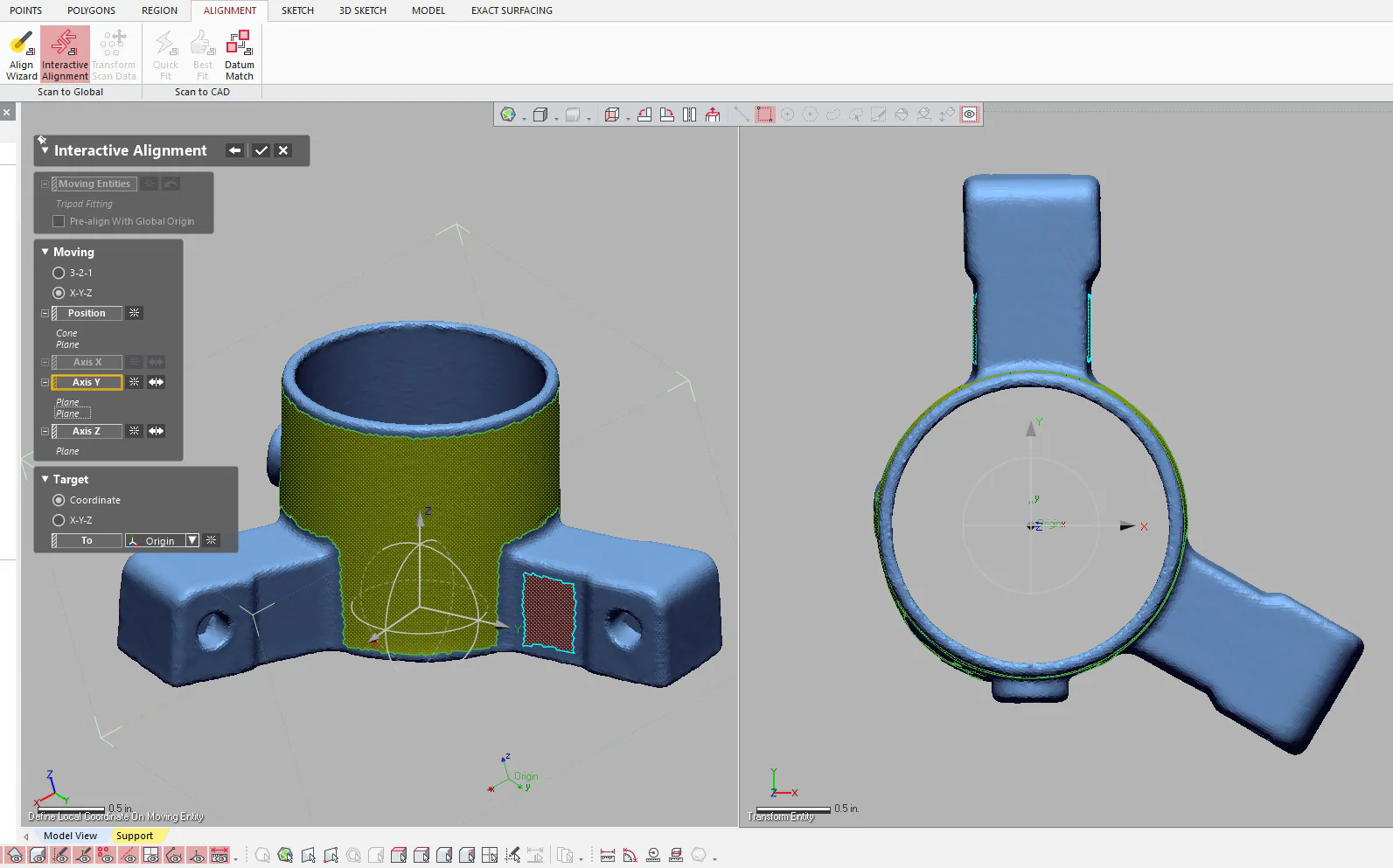
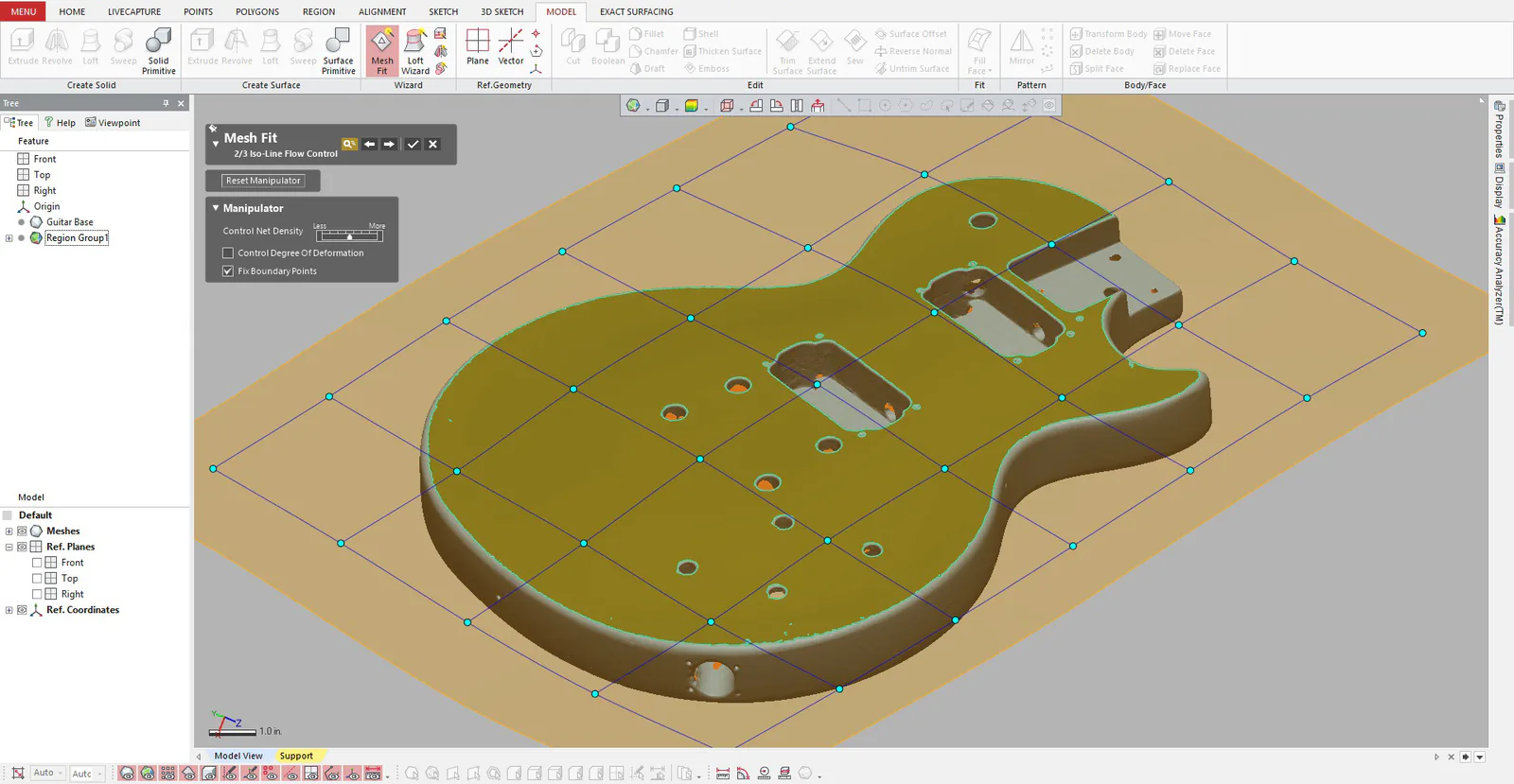
The Wrap screens work on the mesh as a shape. Mesh Doctor marks spikes, creased edges and small holes in red on a scanned dental arch, and Unroll flattens a copy of a scanned tire into a straight strip of tread that can be measured like a flat object. The Design X screens work toward features. Interactive Alignment sets the axes of a scanned clamp from a cylinder and planes in a split view, and Mesh Fit drapes a control net over the curves of a scanned guitar body to make a surface. Wrap perfects the shape; Design X turns it into geometry you can dimension.
Geomagic Wrap
Geomagic Design X
What is the difference between a surface model and editable CAD?
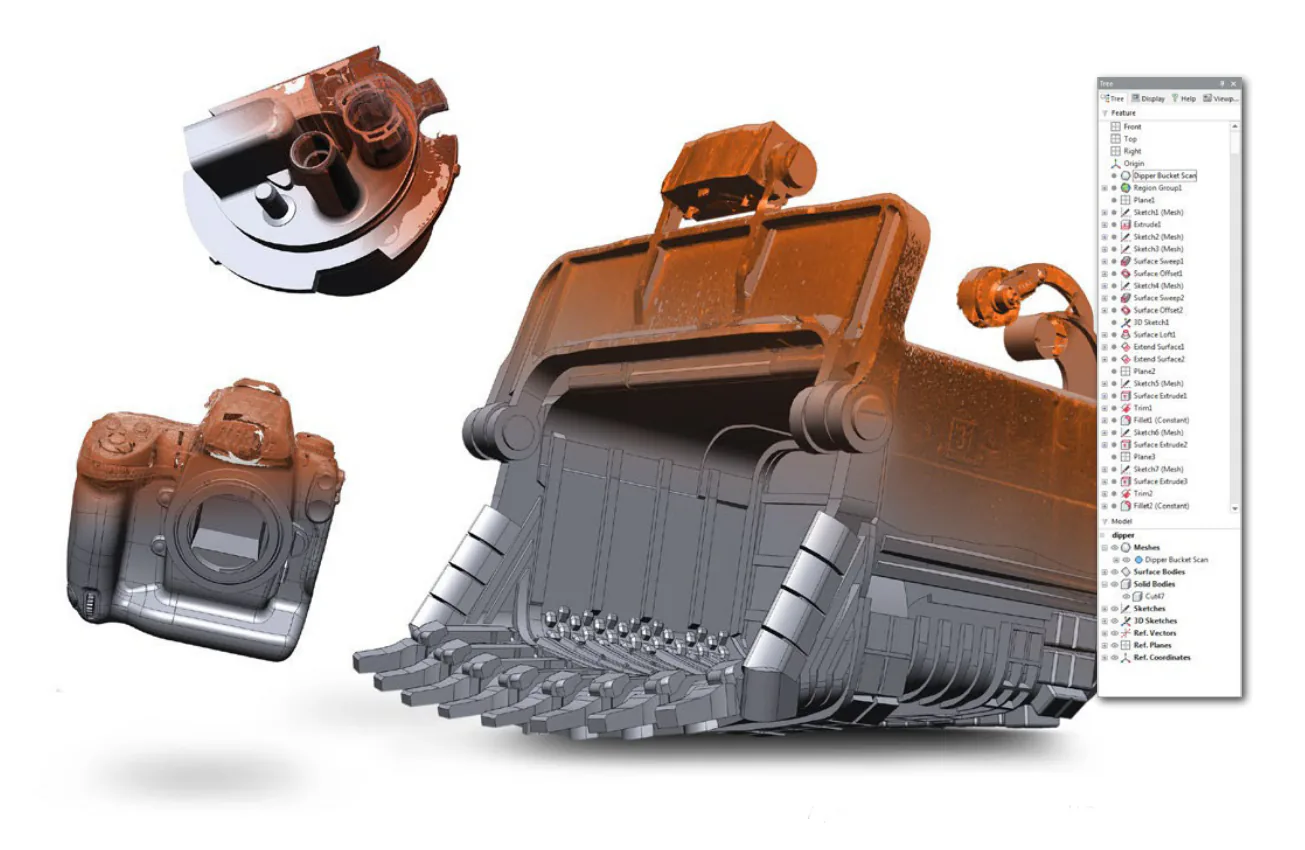
A surface model describes the outside of the shape. Wrap builds one by fitting NURBS patches over the scan, with control of where the patches run and how smoothly they join, and can close them into a solid that CAD software can use. Editable CAD describes how the shape is made. Design X sorts the scan into regions, fits sketches and surfaces, and builds solids step by step on a parametric history tree, so engineers can change dimensions later. Both are valid CAD deliverables; they suit different people downstream.
Which shapes suit Wrap, and which suit Design X?
Wrap is built for complex, organic shapes where feature-based modeling struggles: sculptures, anatomy, dental models, cast fittings and styled consumer products, often with color worth keeping. Design X is built for parts that carry engineering intent. Its region groups sort a mesh into planes, cylinders, cones, spheres, revolved and freeform areas, so holes and faces become exact features while cast or molded areas get surfaces, on anything from a small machined bracket to an excavator bucket. A cast handle may sit on either side; ask whether anyone will change its dimensions.
Where does each model go next?
Wrap's results leave in many forms. Meshes go to 3D printing as STL, OBJ, PLY or 3MF; surfaces and solids go to CAD as STEP, IGES, X_T or SAT; models also feed FEA and CFD work and animation tools such as Maya and 3ds Max. Design X's results go to CAD with their history: LiveTransfer sends the whole feature tree, or single features, to SOLIDWORKS, NX, Creo, AutoCAD or Inventor, where the model keeps working for drawings, toolpaths and simulation. If the next person in line is a designer in a CAD system, that points to Design X; if it is a printer, an analyst or an animator, to Wrap.
Can one team use Wrap and Design X together?
Yes. Both read the same scan data and share the same requirements figures, so they can sit on one workstation. One workable split is Wrap for the deliverables that are shapes, such as print files, archive models and surface models of organic forms, and Design X for the parts engineers will edit. A scan cleaned and repaired in Wrap can also move on to Design X as a mesh, since every Design X plan imports points and meshes. We can quote Design X beside Wrap when you need both kinds of output.
What else do buyers ask about Geomagic Wrap and Geomagic Design X?
Can Wrap make a solid for CAD?
Yes. Exact Surfacing fits NURBS patches over the scan, and Wrap can turn them into surfaces or solids that CAD software can use, exported as STEP, IGES, X_T or SAT for SOLIDWORKS or any other system. What you get is the shape as surfaces, not a sequence of features: for editable, feature-based CAD with a history tree, the maker points to Design X.
Does Design X also prepare scans for 3D printing?
It can. One of the uses listed for Design X is to heal and close a scan mesh so it prints, then rebuild it as CAD when dimensions have to change, and its Healing Wizard repairs folded, crossing and dangling triangles. Wrap goes further on the mesh side: Mesh Doctor, hole filling that follows the surrounding curvature, spike removal, and 3MF export next to STL, OBJ and PLY since version 2024.3. If printing is most of the work, Wrap's toolset is aimed at it.
Which one can run my scanner directly?
Both can, with conditions. Wrap can drive supported scanners directly or bring in raw scan data from any device. Design X reads data from any scanner in every plan, and direct scanner and probe integration comes with the Plus and Pro plans. Artec names the Eva and the Leo with Wrap and states that all its scanners work with Design X. Tell us your scanner, and we confirm the connection before you order.
Do Wrap and Design X need different computers?
No. Wrap's 2024.3.2 guide and the Design X 2026.1 guide list the same workstation: the same Windows versions, the same memory floor and recommendation, the same NVIDIA graphics figures and the same three-button or 3D mouse. Design X also rules out SLI. One machine sized for your largest scans runs both, and the operating system row of the table on this page shows the Windows figures both name.
See Geomagic Wrap and Geomagic Design X on your own scans
Choose a scan that could go either way, such as a cast handle or a styled housing. We process it in Wrap as a surface model and rebuild it in Design X as editable CAD, so you compare the two deliverables side by side. Ask for both in your request; we confirm whether both can be shown where you work. On-site demos are available in most areas; ask when you request.