Software comparison
Geomagic Control X vs Geomagic Design X
These two Geomagic programs read the same scans but answer different questions. Control X asks whether a part matches its design; Design X asks what the design is. Many buyers need one, and some need both.
Key takeaways
- Control X compares measured data with CAD or another scan; Design X creates CAD from a scan.
- Control X delivers deviation maps, GD&T results, reports and DMIS files; Design X delivers feature-based models with a parametric history tree.
- Control X automates with Visual Scripting, an Automation Server and batch analysis; Design X Pro adds guided and automated modeling wizards.
- Both read data from any scanner, and both are at version 2026.1.
- Both follow the same requirements figures, and Control X also needs Microsoft Office for its reporting tools.
Which should you choose: Geomagic Control X or Geomagic Design X?
Choose Geomagic Control X when the question is whether a part matches its design: it aligns scan or probe data to a CAD model or a reference scan and turns the differences into deviation maps, GD&T checks and reports for managers, customers and suppliers. Choose Geomagic Design X when the question is what the design should be: it rebuilds the scanned part as editable, feature-based CAD and sends the history tree to SOLIDWORKS, NX, Creo, AutoCAD or Inventor. They are different tools, not rivals. A team that rebuilds parts and also checks them can run both on the same scan data and the same Windows workstation.
Choose Geomagic Control X if…
- You check first-article or production parts against CAD and report the results.
- Your customers' CAD arrives with PMI that you want to inspect from.
- You want scripted or batch inspections that run with little operator input.
- You compare worn or repaired parts with an earlier scan of themselves.
Choose Geomagic Design X if…
- You rebuild parts that have no CAD, or whose CAD no longer matches the part.
- You design aftermarket or custom parts to fit existing products.
- Your CAD system is SOLIDWORKS, NX, Creo, AutoCAD or Inventor.
- You rebuild castings, molds or tooling as solids with surfaces.
How do Control X and Design X compare side by side?
Because the two programs do different jobs, read the table for fit rather than for a score. The upper rows show that both take data from any scanner but produce different things: deviation maps, GD&T checks and reports from Control X, editable CAD models from Design X. The middle rows show which CAD files each one opens, where its results go and how each automates repeat work. The bottom rows show how much the two share: the same version number, the same Windows requirements, and one difference, Microsoft Office for the Control X reports. Every cell comes from our product records.
| Specification | Geomagic Control X | Geomagic Design X |
|---|---|---|
| What it does | 3D inspection and metrology software for scan and probe data | Reverse engineering software that turns 3D scans into editable CAD |
| Scan data it takes | Capture directly in Control X, or scan data from any 3D scanner or portable CMM | Data from any scanner; Direct scanner and probe integration (Design X Plus, Design X Pro) |
| What it produces | Deviation maps, GD&T checks and reports | Feature-based, editable CAD models |
| CAD files it opens | CATIA V5, Creo and Pro/ENGINEER, Inventor, NX, SOLIDWORKS and STEP | Point, mesh and CAD import and export; CAD-native import and export (Design X Pro) |
| Where results go | Results go out as reports, which need Microsoft Office, or as a DMIS file | SOLIDWORKS, NX, Creo, AutoCAD, Inventor |
| Analysis tools | Directional tolerances, deviation location, scan annotation, airfoil analysis, multi-alignment inspection, Smart Dimensioning | Basic deviation analysis (Design X Go); Detailed (Design X Plus, Design X Pro) |
| Automation | Visual Scripting and Automation Server | Guided and automated wizards (Design X Pro) |
| Current version | 2026.1.0 | 2026.1.0 |
| Operating system | Minimum Windows 10 64-bit or later; recommended Windows 11 64-bit | Minimum Windows 10 64-bit or later; recommended Windows 11 64-bit |
| Other requirements | Three-button or 3D mouse; Microsoft Office for the reporting tools; Windows tablets and SLI not supported | Three-button or 3D mouse; Windows tablets and SLI not supported |
Geomagic Control X vs Geomagic Design X: side by side
What it does
- Geomagic Control X
- 3D inspection and metrology software for scan and probe data
- Geomagic Design X
- Reverse engineering software that turns 3D scans into editable CAD
Scan data it takes
- Geomagic Control X
- Capture directly in Control X, or scan data from any 3D scanner or portable CMM
- Geomagic Design X
- Data from any scanner; Direct scanner and probe integration (Design X Plus, Design X Pro)
What it produces
- Geomagic Control X
- Deviation maps, GD&T checks and reports
- Geomagic Design X
- Feature-based, editable CAD models
CAD files it opens
- Geomagic Control X
- CATIA V5, Creo and Pro/ENGINEER, Inventor, NX, SOLIDWORKS and STEP
- Geomagic Design X
- Point, mesh and CAD import and export; CAD-native import and export (Design X Pro)
Where results go
- Geomagic Control X
- Results go out as reports, which need Microsoft Office, or as a DMIS file
- Geomagic Design X
- SOLIDWORKS, NX, Creo, AutoCAD, Inventor
Analysis tools
- Geomagic Control X
- Directional tolerances, deviation location, scan annotation, airfoil analysis, multi-alignment inspection, Smart Dimensioning
- Geomagic Design X
- Basic deviation analysis (Design X Go); Detailed (Design X Plus, Design X Pro)
Automation
- Geomagic Control X
- Visual Scripting and Automation Server
- Geomagic Design X
- Guided and automated wizards (Design X Pro)
Current version
- Geomagic Control X
- 2026.1.0
- Geomagic Design X
- 2026.1.0
Operating system
- Geomagic Control X
- Minimum Windows 10 64-bit or later; recommended Windows 11 64-bit
- Geomagic Design X
- Minimum Windows 10 64-bit or later; recommended Windows 11 64-bit
Other requirements
- Geomagic Control X
- Three-button or 3D mouse; Microsoft Office for the reporting tools; Windows tablets and SLI not supported
- Geomagic Design X
- Three-button or 3D mouse; Windows tablets and SLI not supported
Specs checked:
What does each program do with a scan?
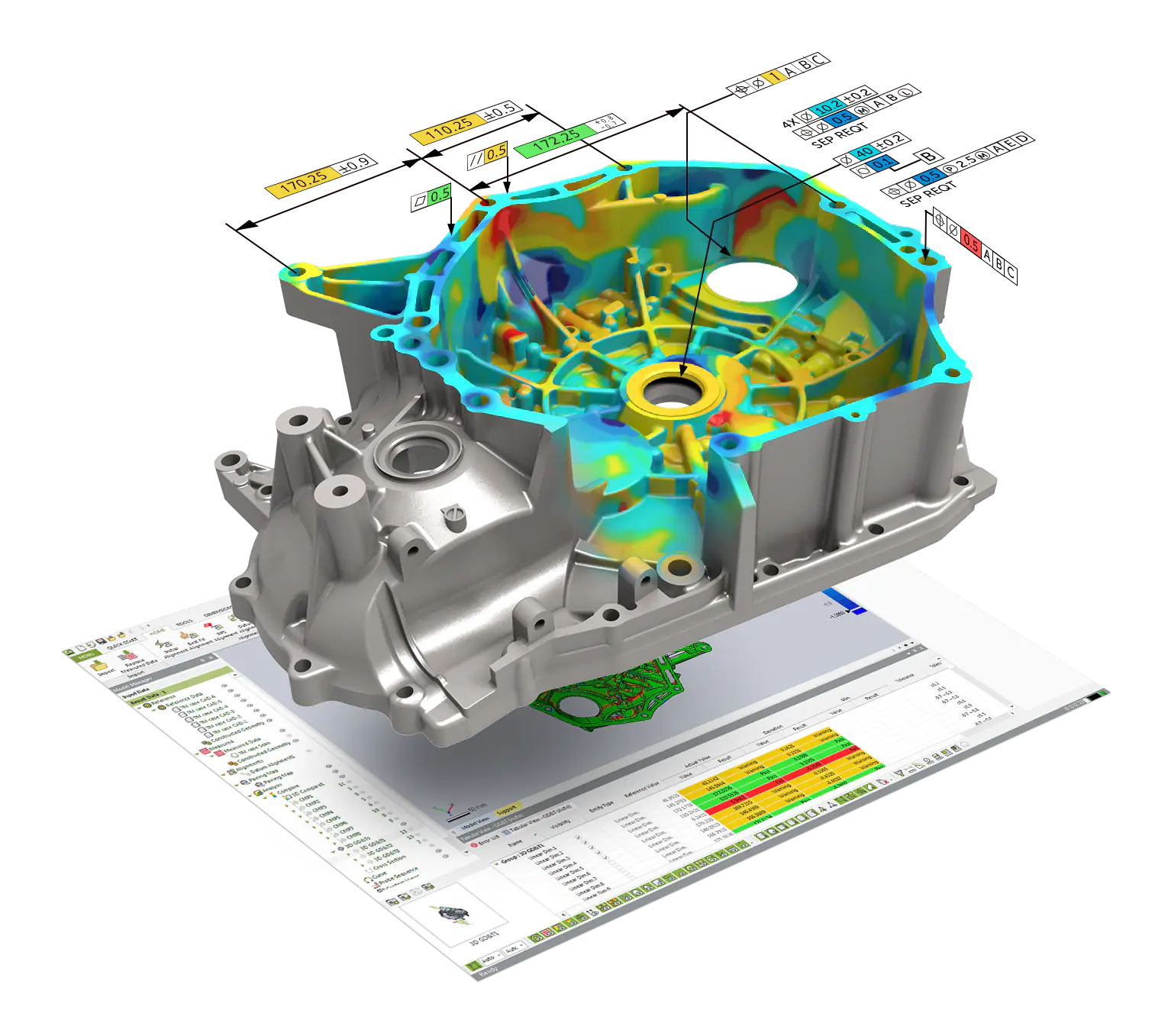
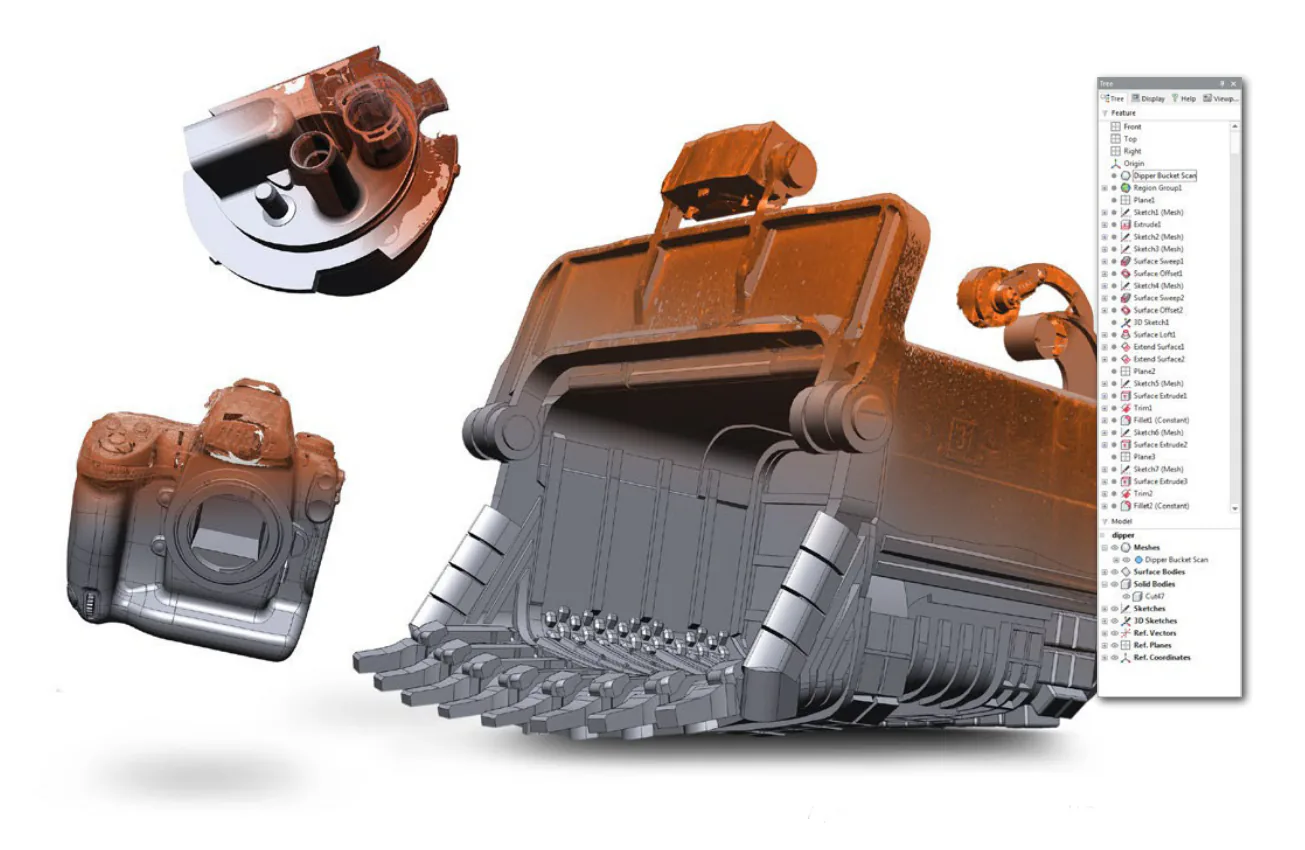
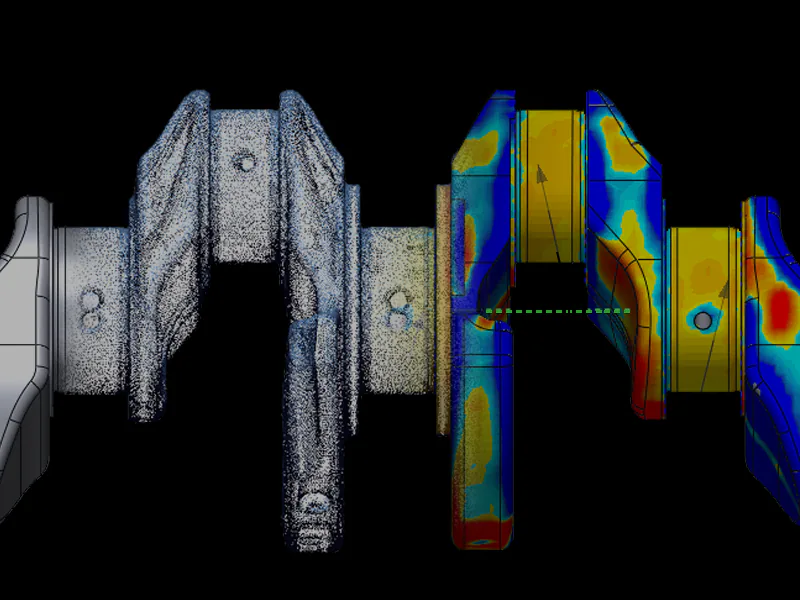
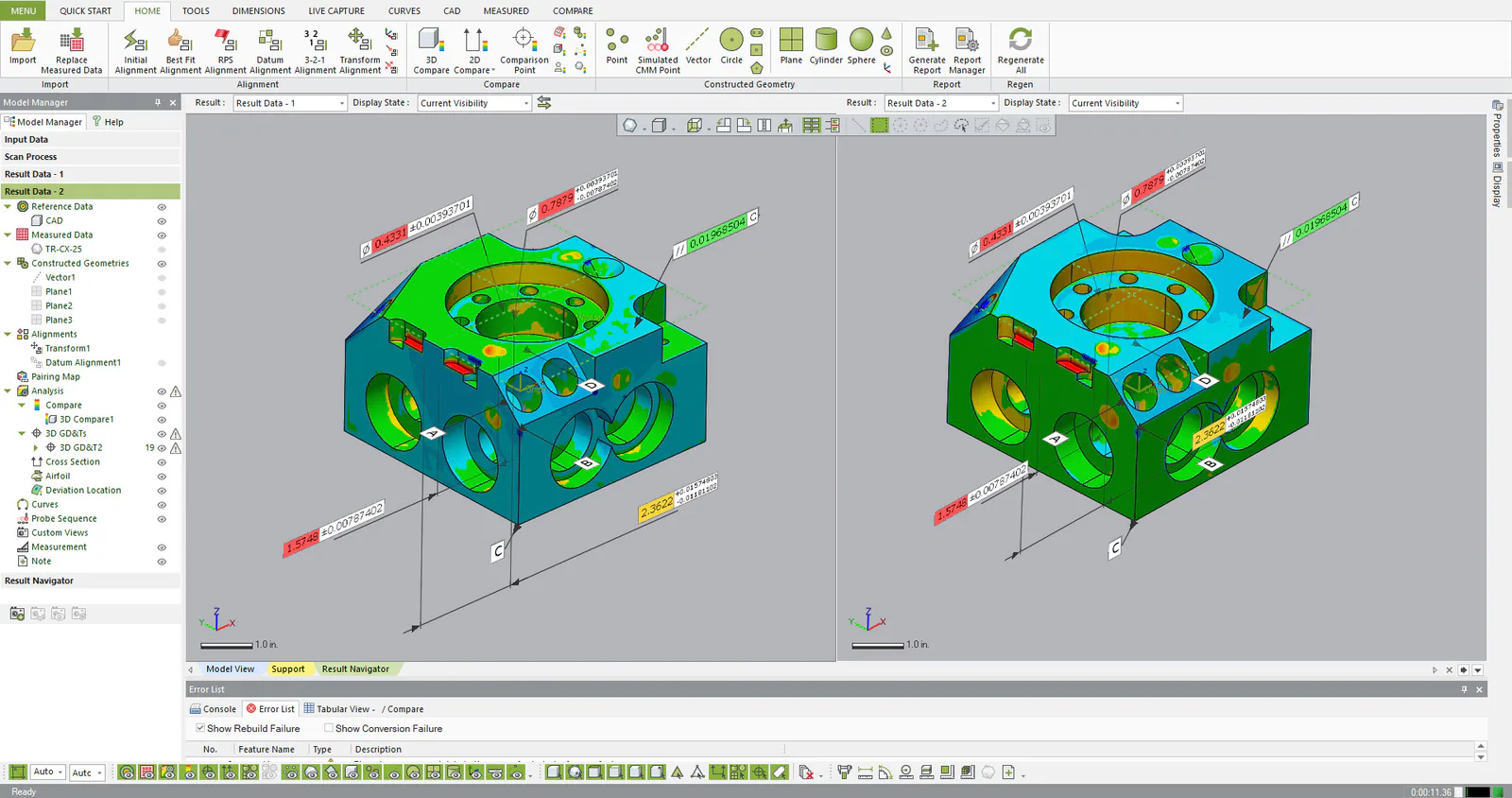
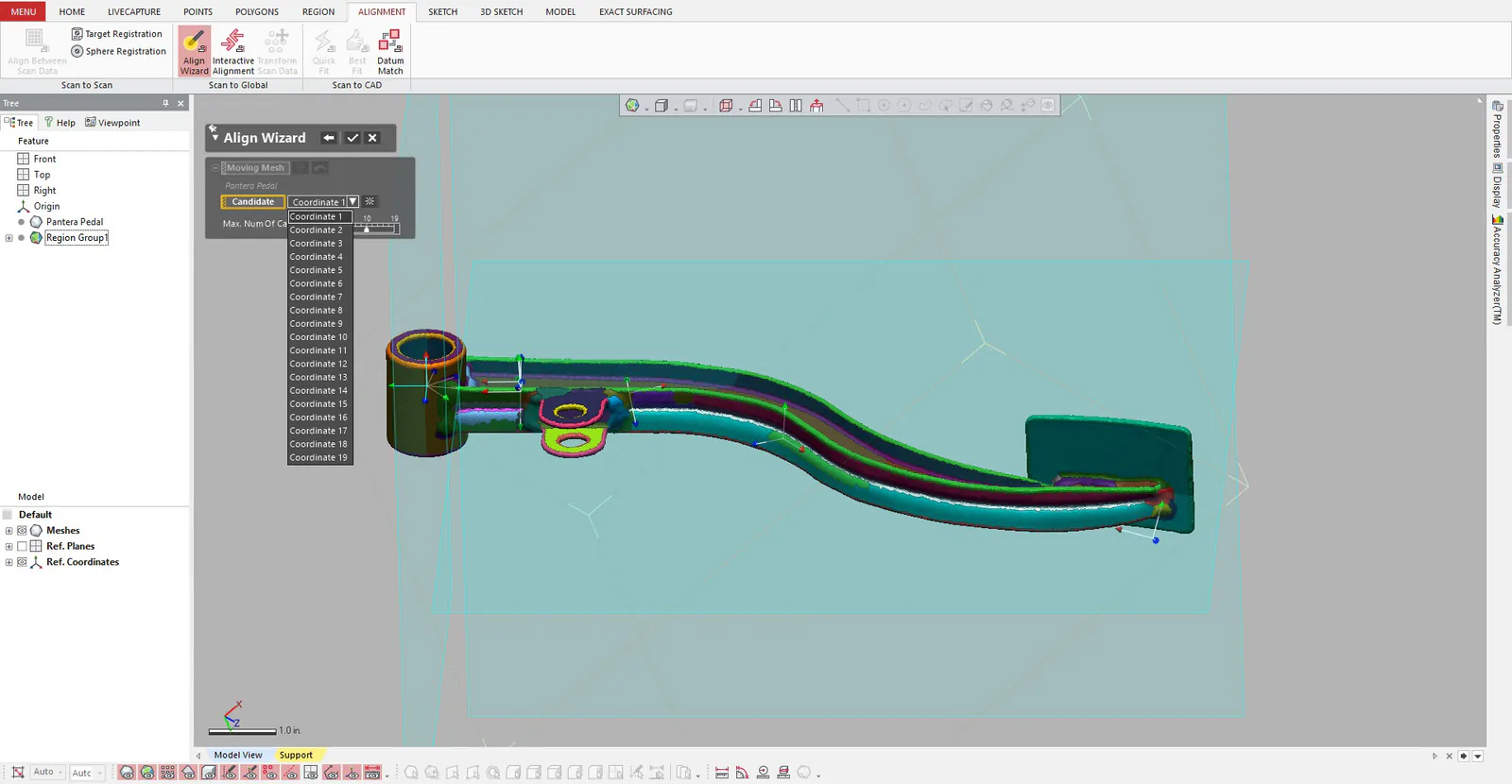
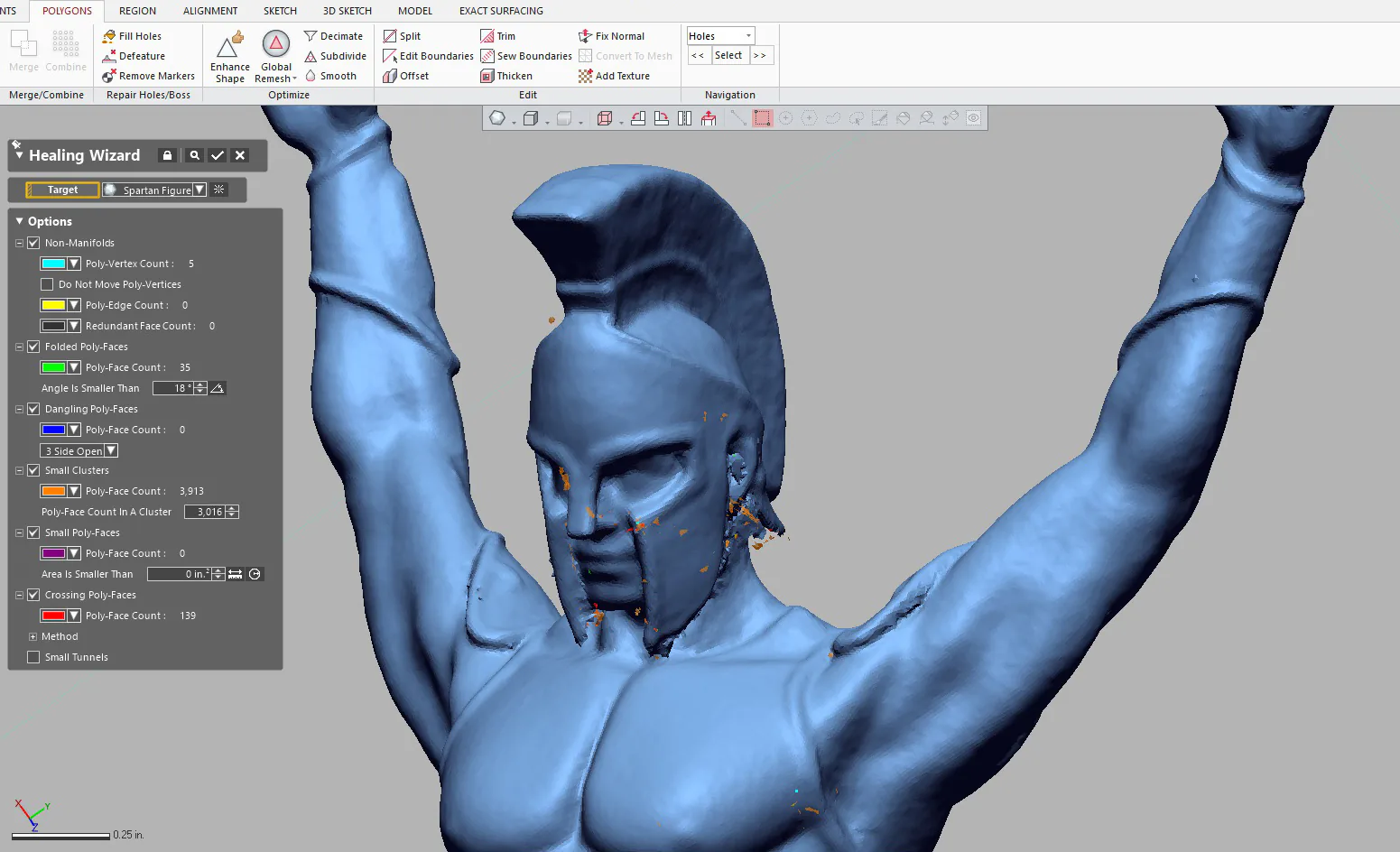
Control X starts from a scan and a reference. One screen splits a crankshaft in two, raw scan points on the left and a color deviation map on the right; another shows the Result Navigator with two results of one machined block side by side, measured under different conditions. Design X starts from a scan and builds. Its Align Wizard proposes coordinate systems taken from a scanned pedal arm's own geometry, and its Healing Wizard colors each kind of mesh defect on a scanned figure before anything is changed. One program measures what is there; the other prepares to model it.
Geomagic Control X
Geomagic Design X
What question does each program answer?
Control X answers 'is this part right?'. It takes a measured part, aligns it to the CAD model or to a scan of a known good part, and shows where and by how much it departs, as color maps, GD&T results and reports. Design X answers 'what is this part?'. It takes a part that has no usable CAD, such as a legacy casting, a mold or an aftermarket part, and rebuilds it as an editable model. If your work starts with a drawing and ends with a report, you need Control X; if it starts with a physical part and ends with a CAD file, you need Design X.
Does either one need a CAD model to start?
Neither does. Control X can measure a part against a scan of a good one, or against an earlier scan of itself, until a model exists. Design X needs no CAD by definition: its job is to make one. When CAD does exist, it helps both. In Control X, PMI from CATIA V5, Creo, NX or SOLIDWORKS brings the GD&T in with the model. In Design X, the Pro plan imports native CAD files, from CATIA V5 to SOLIDWORKS, next to the scan.
When do you need both?
When a part has to be rebuilt and then checked, or checked and then rebuilt. A legacy part with no drawings is reverse engineered in Design X, and the new production parts are then inspected in Control X against that model. A worn or repaired part is compared in Control X with its CAD or an earlier scan to decide what to rework, and when no CAD exists, Design X builds it first. Both read data from any scanner and share the same requirements figures, so one Windows workstation with Microsoft Office for the reports runs both, and we can quote them together.
Who on a team uses each program?
Control X is built for quality engineers and metrologists who verify parts, from first article inspection to repeat production checks. Visual Scripting, the Automation Server and batch analysis let them run routine jobs with little operator input, and their reports go to managers, customers and suppliers. Design X is built for engineers and designers who recreate legacy parts, customize products and speed up development. They work in its modeler and send the result to the CAD program the rest of the team uses, where the dimensions drive the drawings. In a small shop, one person may do both jobs.
What else do buyers ask about Geomagic Control X and Geomagic Design X?
Can Control X build a CAD model from a scan?
That is Design X's job. Control X is built to compare measured data with a reference and report the result, from deviation maps to GD&T and DMIS output. When a part needs a new CAD model, Design X reads the same scan data and rebuilds it as editable, feature-based CAD. If you need both a report and a model from one scan, plan on both programs, or ask us which one to start with for your mix of work.
Can Design X check a model against the scan?
Yes, for the model it builds. Its Accuracy Analyzer compares the rebuilt CAD with the scan, with basic deviation analysis in Design X Go and a detailed analysis in Plus and Pro, so you see how closely the model follows the real part. That is a check on your modeling, not an inspection report. For GD&T results, batch inspections and reports for customers, Control X is the tool.
Can one workstation run both programs?
Yes. The 2026.1 requirements guides for the two match line for line. The floor is 64-bit Windows 10, 8 GB of RAM and 30 GB free on disk, plus about 3 GB of cache per 100 million points; Windows 11 and 32 GB or more are recommended, with an NVIDIA graphics card. Control X adds one item, Microsoft Office for its reporting tools. Size the machine for your largest scans, since both work on very large data sets.
Which one should a shop buy first?
The one that matches the work you are paid for today. If customers send drawings or models and expect inspection reports, Control X comes first. If you remake parts that have no CAD, or design parts to fit existing products, Design X comes first. Because both read the same scan data, the second program can join later without changing how you scan. Tell us what you scan and what you deliver, and we suggest an order.
See Geomagic Control X and Geomagic Design X on your own scans
Pick one part that needs both jobs, such as a worn component with no current CAD. We scan it where you work, rebuild it in Design X and inspect it in Control X, so you see each program on the same data. Tell us you want both programs, and we confirm whether both can come to your site. On-site demos are available in most areas; ask when you request.