Software comparison
Geomagic Design X vs Creaform Scan-to-CAD
Both turn a scan into CAD for engineers who reverse engineer parts. Design X builds the whole model in its own modeler; Scan-to-CAD prepares the scan inside Creaform's suite and hands the geometry to the CAD program you already use.
Key takeaways
- Design X rebuilds a scan as feature-based solids and surfaces with a parametric history tree; Scan-to-CAD prepares meshes, surfaces and entities for your CAD program.
- LiveTransfer in Design X reaches SOLIDWORKS, NX, Creo, AutoCAD and Inventor; Scan-to-CAD transfers entities to SOLIDWORKS, Autodesk Inventor, Autodesk Fusion 360 and Solid Edge.
- Design X comes in Go, Plus and Pro plans; Scan-to-CAD comes as a standard and a Pro version, and Pro is included with the HandySCAN 3D PRO Series.
- Design X reads data from any scanner; Scan-to-CAD works on meshes captured in Creaform.OS.
- Creaform scans can move on to Design X as standard mesh files when a part needs a full feature-based rebuild.
Which should you choose: Geomagic Design X or Creaform Scan-to-CAD?
Choose Geomagic Design X when the result must be a complete, editable model: it builds solids and surfaces on a parametric history tree, and LiveTransfer carries that tree into SOLIDWORKS, NX, Creo, AutoCAD or Inventor. Every plan reads data from any scanner, so a mixed fleet is no obstacle. Choose Creaform Scan-to-CAD when you capture with Creaform hardware and your designers finish models in their own CAD program: it aligns and cleans the mesh, fits NURBS surfaces, extracts entities, curves and cross-sections, and a right-click sends the entities to SOLIDWORKS, Autodesk Inventor, Autodesk Fusion 360 or Solid Edge. Scan-to-CAD Pro adds sketching plus extrude, revolve and cut. The deciding question is where your team wants the modeling to happen.
Choose Geomagic Design X if…
- You need finished, editable solids with a parametric history tree, not only entities to model from.
- Your designers work in NX, Creo, AutoCAD or Inventor as well as SOLIDWORKS.
- Your scans come from more than one scanner, or from a scanner other than Creaform.
- Your parts mix exact machined features with cast or freeform surfaces.
Choose Creaform Scan-to-CAD if…
- You scan with Creaform hardware and want reverse engineering in the same Creaform software.
- Your designers prefer to finish every model in SOLIDWORKS, Inventor, Fusion 360 or Solid Edge.
- You are buying a HandySCAN 3D PRO Series, which includes Scan-to-CAD Pro.
- Many of your parts can be built from sketches with extrude, revolve and cut.
How do Design X and Scan-to-CAD line up, row by row?
Read the table from top to bottom and it follows a reverse-engineering job: where each program sits, the scans it accepts, how it builds geometry, how it handles freeform areas and damaged meshes, and how the result reaches your CAD system. Every cell repeats our product records for the two programs, which we checked against the makers' pages, in the makers' own terms. Where a plan or a version changes the answer, the cell names it, such as Exact Surfacing in Design X Pro or sketching in Scan-to-CAD Pro. The two rows to read twice are the CAD systems each one reaches and the way the transfer works.
| Specification | Geomagic Design X | Creaform Scan-to-CAD |
|---|---|---|
| What it does | Reverse engineering software that turns 3D scans into editable CAD | Reverse-engineering software module for 3D scan data |
| Where it sits | Design X sits between your scanner and your CAD system | The reverse-engineering module of the Creaform Metrology Suite |
| Scan data it takes | Data from any scanner; Direct scanner and probe integration (Design X Plus, Design X Pro) | Mesh data from Creaform scanners; data captured in Creaform.OS |
| How it builds the model | Builds solids with a parametric history tree | Extracts geometric entities, curves and cross-sections that you can send to CAD; Scan-to-CAD Pro adds 2D sketching and 3D modeling with extrude, revolve and cut |
| Freeform surfacing | Auto-surfacing with selective surfacing (Design X Plus, Design X Pro); Exact Surfacing (Design X Pro) | NURBS surfaces using automatic or manual surfacing |
| Mesh cleanup | The Healing Wizard repairs folded, crossing and dangling triangles | Mesh tools fill holes, merge, decimate and make meshes watertight |
| CAD systems it sends to or runs in | SOLIDWORKS, NX, Creo, AutoCAD, Inventor | SOLIDWORKS, Autodesk Inventor, Autodesk Fusion 360, Solid Edge |
| How the model reaches CAD | LiveTransfer sends the complete feature tree, or single features | With a right-click, entities transfer directly; for any other system, export .iges, .step or .dxf |
| Plans or versions | Go, Plus and Pro | Scan-to-CAD and Scan-to-CAD Pro |
| Current version or first release | 2026.1.0 | 2014 (Scan-to-CAD); February 26, 2025 (Scan-to-CAD Pro) |
Geomagic Design X vs Creaform Scan-to-CAD: side by side
What it does
- Geomagic Design X
- Reverse engineering software that turns 3D scans into editable CAD
- Creaform Scan-to-CAD
- Reverse-engineering software module for 3D scan data
Where it sits
- Geomagic Design X
- Design X sits between your scanner and your CAD system
- Creaform Scan-to-CAD
- The reverse-engineering module of the Creaform Metrology Suite
Scan data it takes
- Geomagic Design X
- Data from any scanner; Direct scanner and probe integration (Design X Plus, Design X Pro)
- Creaform Scan-to-CAD
- Mesh data from Creaform scanners; data captured in Creaform.OS
How it builds the model
- Geomagic Design X
- Builds solids with a parametric history tree
- Creaform Scan-to-CAD
- Extracts geometric entities, curves and cross-sections that you can send to CAD; Scan-to-CAD Pro adds 2D sketching and 3D modeling with extrude, revolve and cut
Freeform surfacing
- Geomagic Design X
- Auto-surfacing with selective surfacing (Design X Plus, Design X Pro); Exact Surfacing (Design X Pro)
- Creaform Scan-to-CAD
- NURBS surfaces using automatic or manual surfacing
Mesh cleanup
- Geomagic Design X
- The Healing Wizard repairs folded, crossing and dangling triangles
- Creaform Scan-to-CAD
- Mesh tools fill holes, merge, decimate and make meshes watertight
CAD systems it sends to or runs in
- Geomagic Design X
- SOLIDWORKS, NX, Creo, AutoCAD, Inventor
- Creaform Scan-to-CAD
- SOLIDWORKS, Autodesk Inventor, Autodesk Fusion 360, Solid Edge
How the model reaches CAD
- Geomagic Design X
- LiveTransfer sends the complete feature tree, or single features
- Creaform Scan-to-CAD
- With a right-click, entities transfer directly; for any other system, export .iges, .step or .dxf
Plans or versions
- Geomagic Design X
- Go, Plus and Pro
- Creaform Scan-to-CAD
- Scan-to-CAD and Scan-to-CAD Pro
Current version or first release
- Geomagic Design X
- 2026.1.0
- Creaform Scan-to-CAD
- 2014 (Scan-to-CAD); February 26, 2025 (Scan-to-CAD Pro)
Specs checked:
What do the two programs hand to your CAD system?
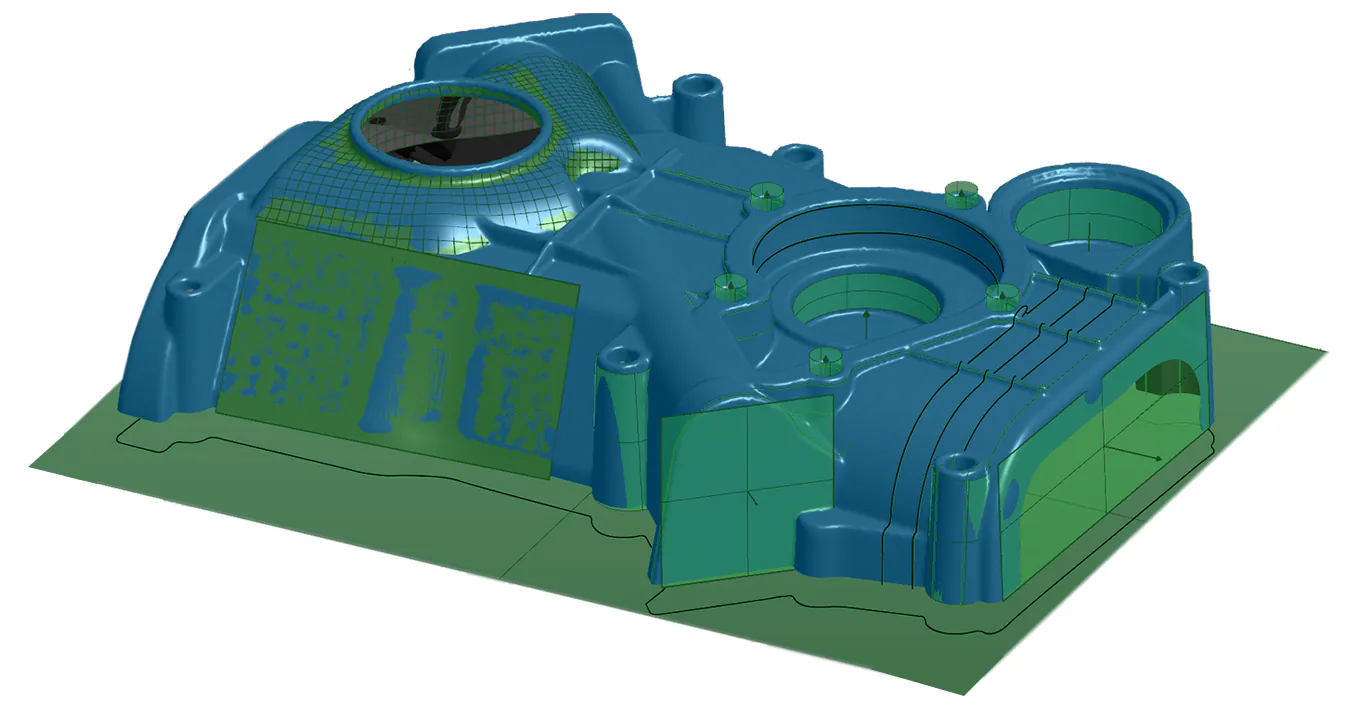
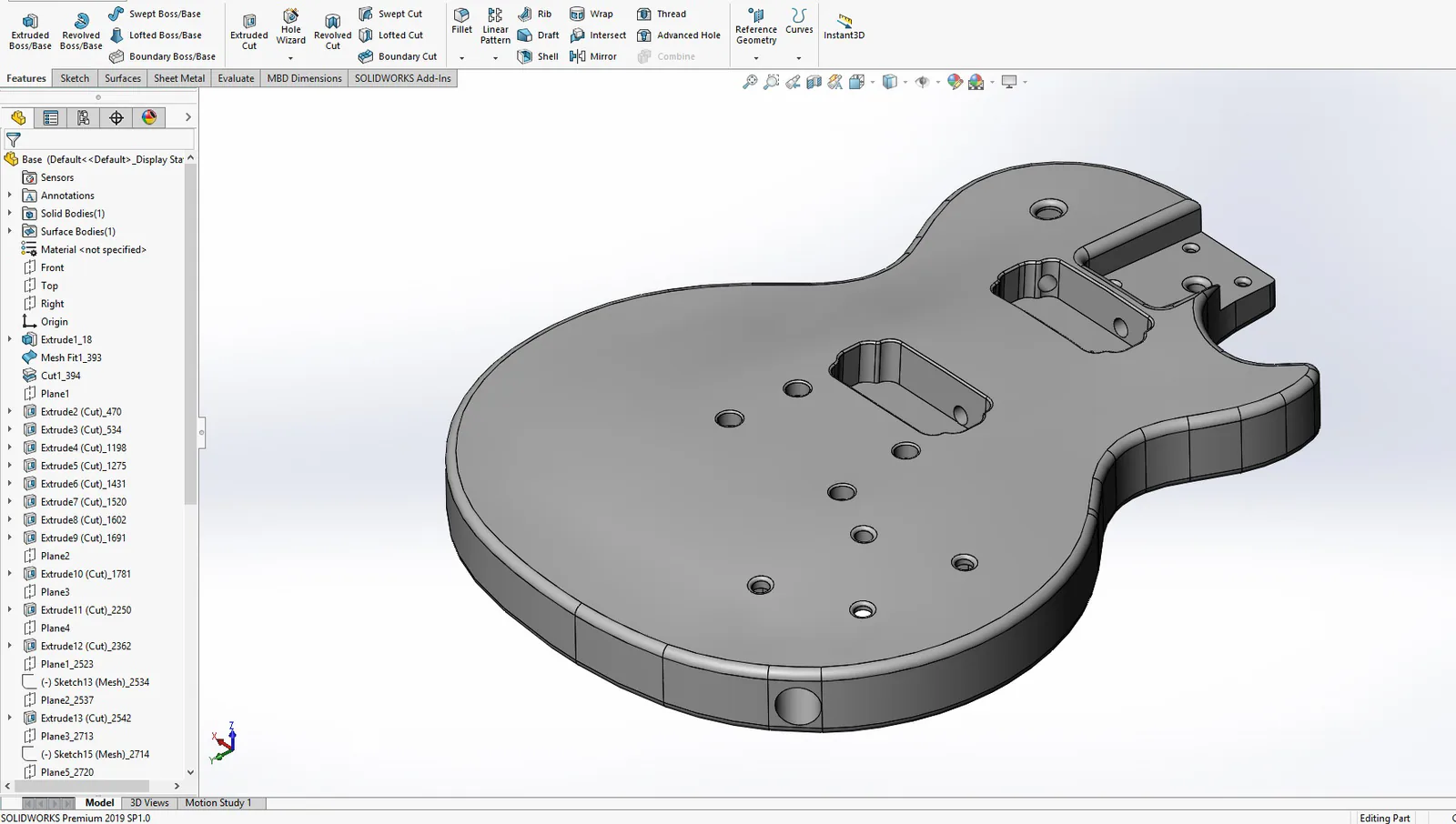
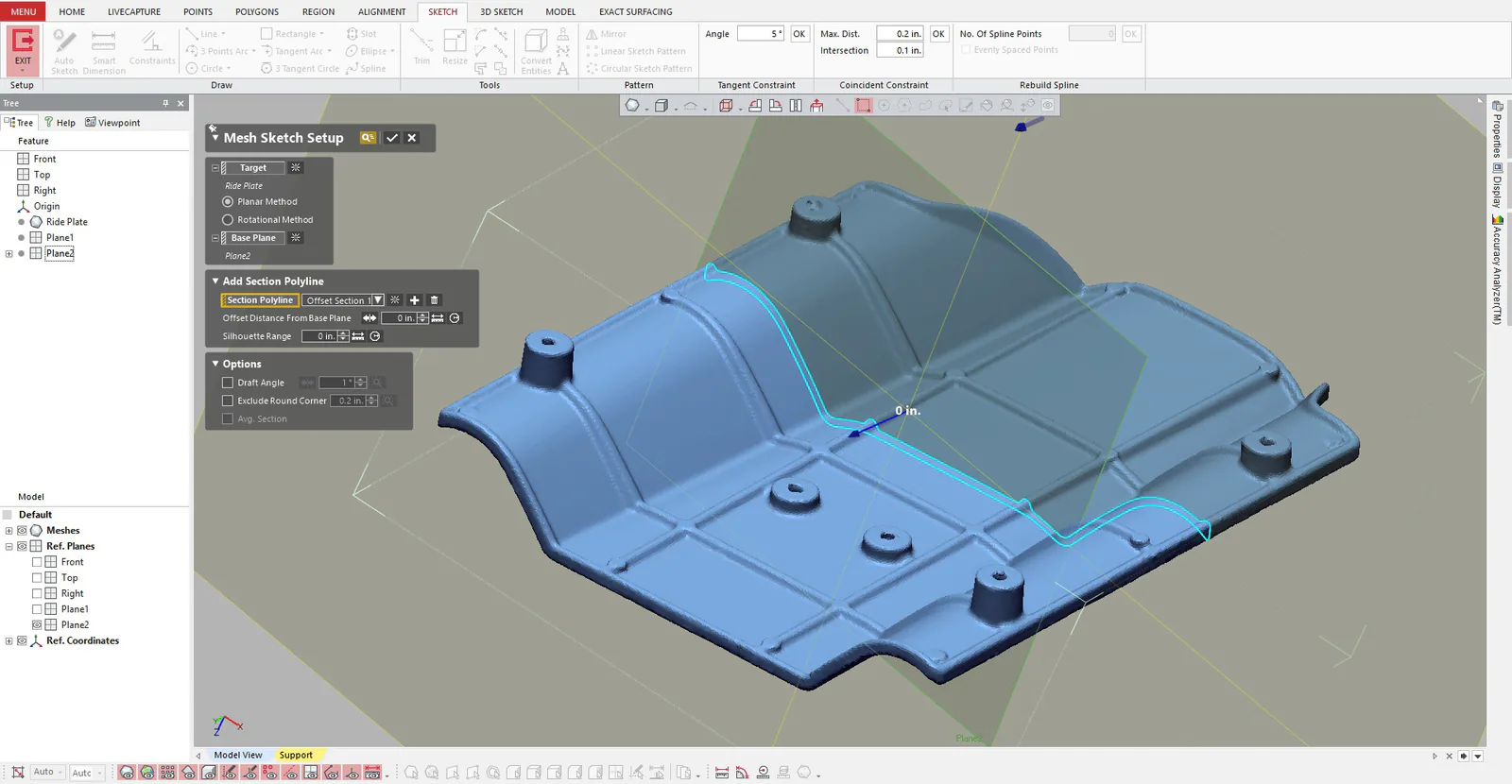
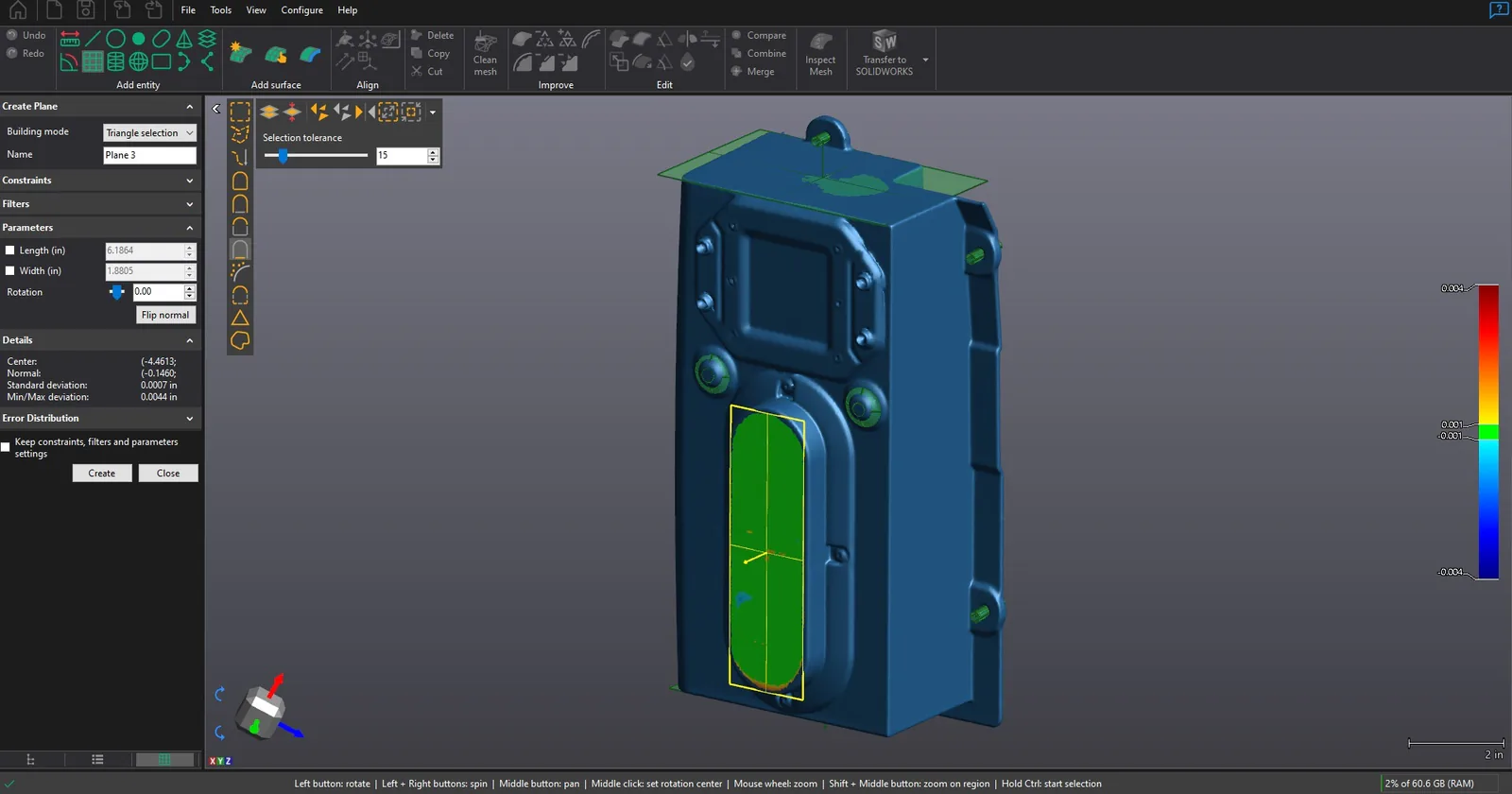
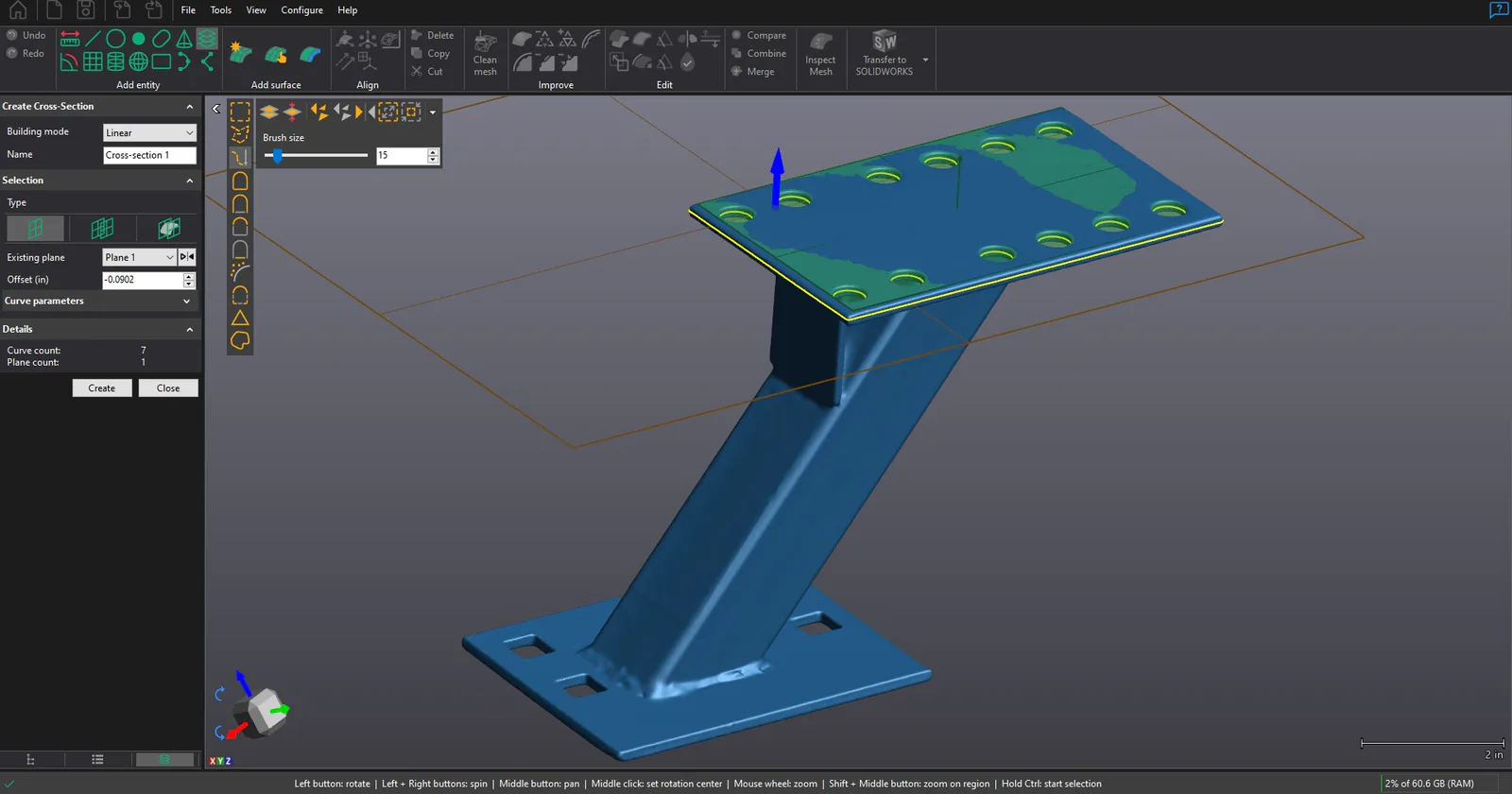
The pictures show the hand-off each program is built around. On the Design X side, a scanned guitar body arrives in SOLIDWORKS with its extrude and cut features listed, so it edits like a part designed there, and a section through a scanned plate becomes a profile to trace. On the Scan-to-CAD side, a fitted plane gives a scanned enclosure its datum, and a section through a welded stand becomes the curves of a SOLIDWORKS sketch. One sends a finished feature tree; the other sends the reference geometry your designers build on.
Geomagic Design X
Creaform Scan-to-CAD
Where does the modeling happen in each program?
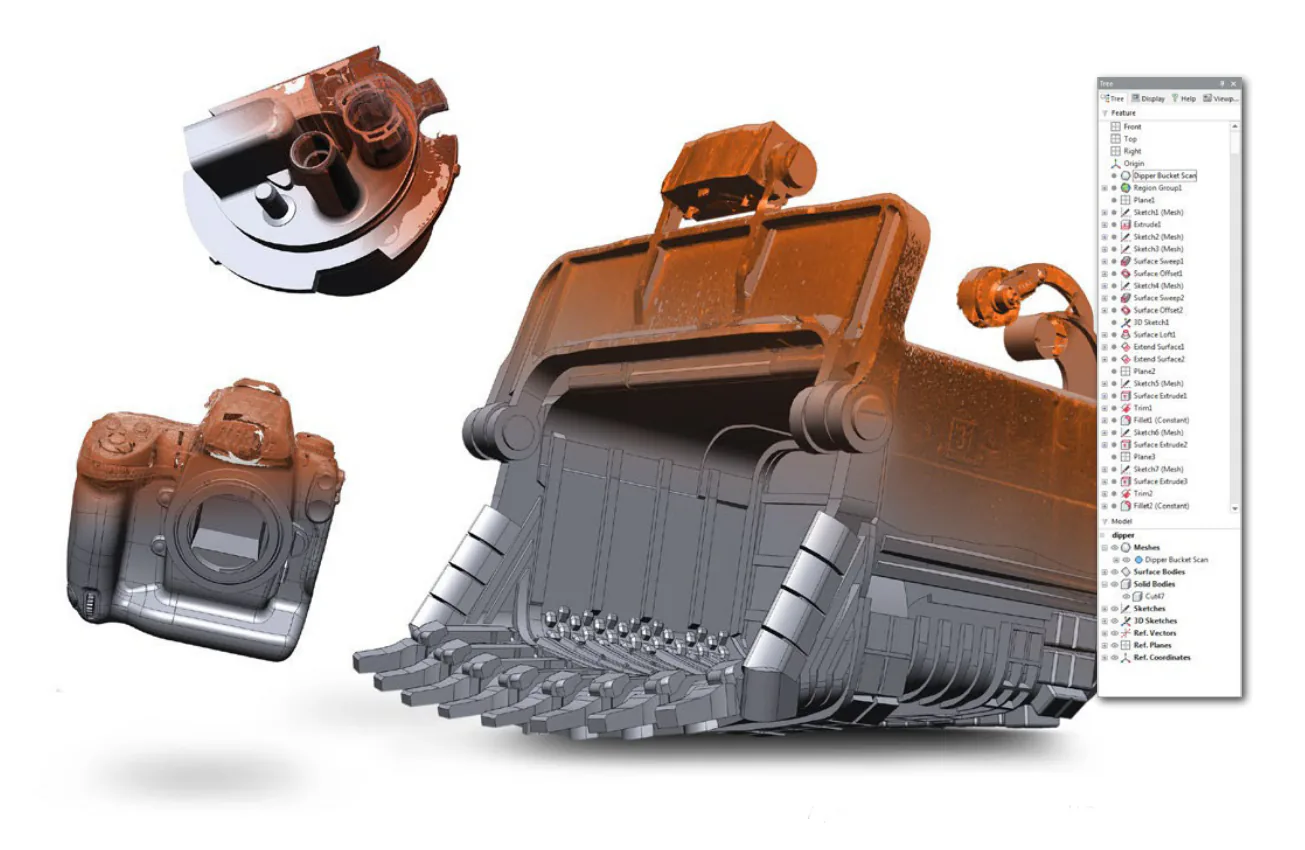
In Design X, the modeling happens inside Design X. It sorts the scan into regions, fits sketches and surfaces, and builds solids on a parametric history tree, in an interface whose feature names are modeled on SOLIDWORKS. LiveTransfer then moves the whole tree, or one feature at a time, into your CAD system, where the dimensions drive drawings. Scan-to-CAD keeps most of the modeling in your CAD program: Creaform describes it as the tools that bring scan data into the CAD software you prefer. Scan-to-CAD Pro goes further with sketches on the scan and extrude, revolve and cut, and Creaform says some workflows finish entirely inside it.
Which scanners and CAD programs does each one connect to?
Design X takes data from any scanner in every plan, and the Plus and Pro plans add direct scanner and probe integration. Artec states that all its scanners work with it, and Creaform scans arrive as standard .stl, .obj or .ply meshes. Scan-to-CAD works on meshes captured in Creaform.OS, so it suits a team that scans with Creaform hardware. On the CAD side, LiveTransfer reaches SOLIDWORKS, NX, Creo, AutoCAD and Inventor. Scan-to-CAD transfers entities straight to SOLIDWORKS, Autodesk Inventor, Autodesk Fusion 360 and Solid Edge, and exports .iges, .step and .dxf files for every other system.
How do the Design X plans and the Scan-to-CAD versions differ?
Design X Go handles point clouds and meshes, essential modeling, basic deviation analysis and LiveTransfer. Design X Plus brings scanner integration, mesh sketching, auto-surfacing and the detailed Accuracy Analyzer. Design X Pro is the plan with wizards, automatic regioning, Auto Sketch, Exact Surfacing and CAD Correction, and it opens native files from CATIA V5, NX, Creo, Inventor, Parasolid and SOLIDWORKS. Scan-to-CAD has two versions. The standard one edits and aligns meshes, fits surfaces, creates entities and takes basic measurements. Scan-to-CAD Pro, released on February 26, 2025, adds 2D sketching and 3D modeling, and the HandySCAN 3D PRO Series includes it.
Which jobs suit each one?
Design X suits jobs where the model must carry engineering intent: legacy parts with no drawings, aftermarket parts that must fit an existing product, and castings or molds that mix exact machined features with freeform areas in one part. Its region groups turn holes and faces into exact features, on anything from a small machined bracket to an excavator bucket. Scan-to-CAD suits shops that rebuild parts in their own CAD program: tools and parts that changed over the years without updated CAD files, worn parts whose design intent is read from cross-sections and curves, and cast or molded surfaces covered with NURBS patches.
Can a Creaform shop use both?
Yes, and the data path is short. Creaform.OS exports standard meshes such as .stl, .obj and .ply, Creaform lists Geomagic among the programs those files work with, and Design X reads them in every plan. One workable split is Scan-to-CAD for everyday entity extraction, cleanup and print preparation, sent to SOLIDWORKS or Solid Edge with a right-click, and Design X for complex castings that must arrive with a history tree, or for models that must reach NX or Creo. Ask us to show both on one of your own scans.
What else do buyers ask about Geomagic Design X and Creaform Scan-to-CAD?
Does Scan-to-CAD send a history tree to SOLIDWORKS the way Design X does?
Not in the same way. Scan-to-CAD transfers entities, such as fitted planes, curves and cross-sections, straight into SOLIDWORKS with a right-click, and your designers build the features there; Scan-to-CAD Pro can also build solids with extrude, revolve and cut inside the module. Design X's LiveTransfer sends features with their order and parent-child relationships, so the model arrives in SOLIDWORKS with a history tree you can edit. Pick by where you want that tree built.
Can Design X read scans from a Creaform HandySCAN?
Yes. Creaform scans reach Design X as standard meshes, for example .stl, .obj or .ply files exported from Creaform.OS, and every plan reads them. Direct scanner and probe integration, capturing inside Design X, comes with the Plus and Pro plans. Tell us your scanner model when you book a demo, and we show the route from your scanner to a finished model on a part you choose.
Which one connects to NX or Creo?
Design X does. LiveTransfer sends its feature tree to NX and Creo as well as SOLIDWORKS, AutoCAD and Inventor, and the Pro plan imports native NX files from NX 11 to NX 2506 and Creo files from Pro/E 16 to Creo 12.0. Scan-to-CAD's direct transfer covers SOLIDWORKS, Autodesk Inventor, Autodesk Fusion 360 and Solid Edge; for other CAD systems it exports .iges, .step and .dxf files. If your team models in NX or Creo, weigh that row of the table first.
Is Scan-to-CAD Pro enough, or do I still need Design X?
For many parts, Scan-to-CAD Pro may be all you need: Creaform presents its sketches and extrude, revolve and cut as a way to finish many models without moving to a full CAD package. Design X earns its place when parts need region groups, modeling wizards, Exact Surfacing or a feature tree that must land in a CAD system with its history. The surest test is to rebuild one typical part in each, so pick the part that took your team longest to model.
See Geomagic Design X and Creaform Scan-to-CAD on your own scans
Tell us about a part your team rebuilt by hand. We scan it where you work and model it in Design X and in Scan-to-CAD, so you compare two results rather than two feature lists. Name both programs when you request a demo, and we confirm whether we can show both near you. On-site demos are available in most areas; ask when you request.