Skip to content
(816) 608-7745Get pricingBook a demo

ArtecHandheld structured-light 3D scanner

Artec Eva

A 0.9 kg target-free color scanner for medium objects, people and parts from about 10 cm up.

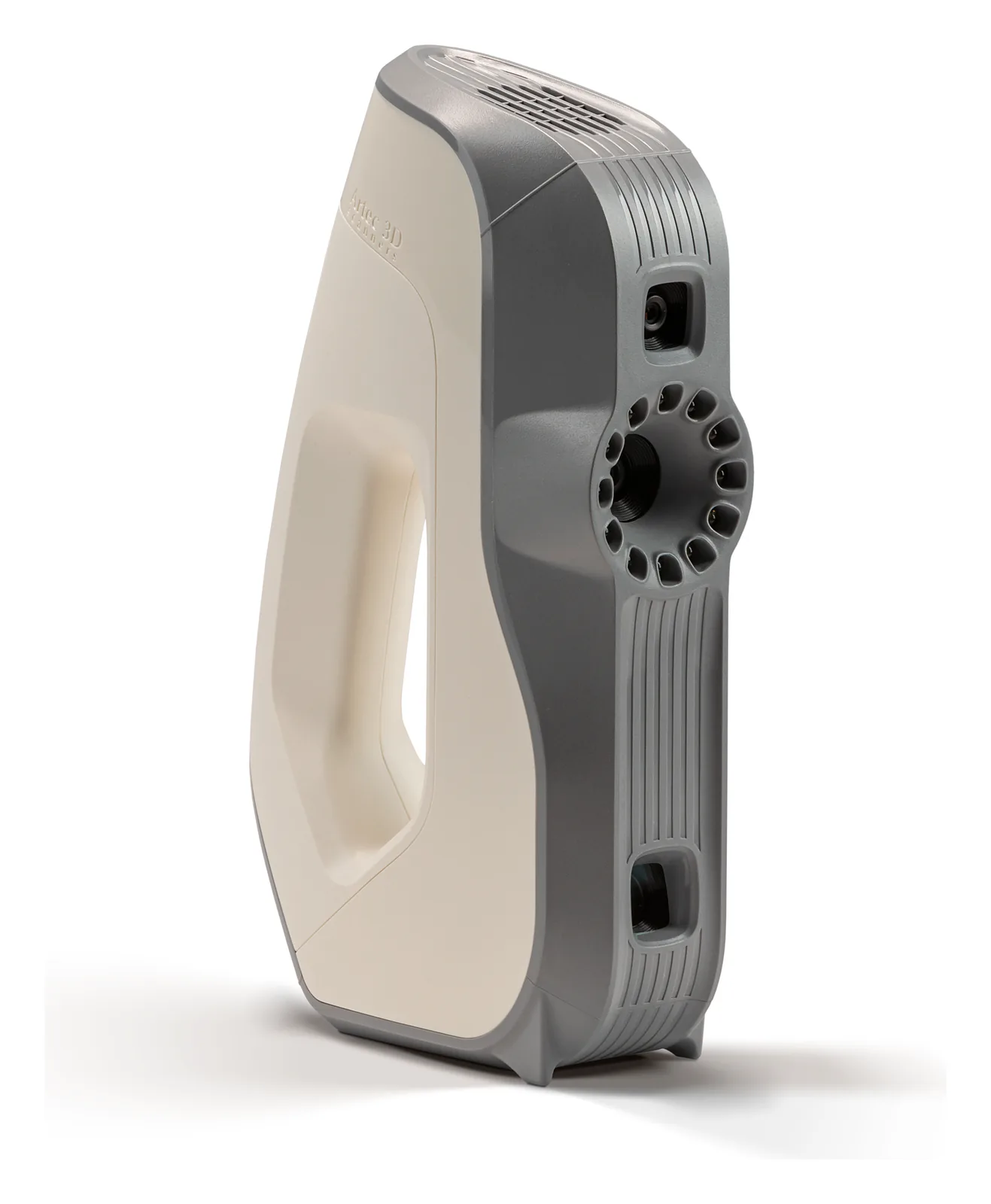
Artec Eva handheld 3D scanner in white and grey, side three-quarter view of the grip and the central lens with its LED ring
Best accuracy
0.1 mm
Part size
0.1–2 m

Key takeaways

  • 3D point accuracy is up to 0.1 mm, and 0.1 mm + 0.3 mm/m over distance.
  • HD mode in Artec Studio lifts resolution to 0.2 mm and helps on thin, black and shiny features.
  • The Eva needs no targets or calibration because it tracks on geometry and color together.
  • It uses white structured light, which Artec states is safe for scanning people and animals.
  • The scanner weighs 0.9 kg, works 0.4 to 1 m from the subject and captures up to 18 million points per second.

What is the Artec Eva?

The Artec Eva is a handheld structured-light scanner for objects from about 10 cm up, with a sweet spot between 20 cm and 2 m: car wheels, busts, body parts and exhaust systems. It projects white light instead of a laser, which Artec states makes it safe for scanning people. Tracking uses geometry and color together, so no targets or calibration are needed before you start. The maker states 3D point accuracy up to 0.1 mm, 0.1 mm + 0.3 mm/m over distance, and resolution up to 0.2 mm in HD mode, with 1.3 MP color texture. It reconstructs up to 16 frames per second, weighs 0.9 kg and connects to a computer over USB.

What can the Artec Eva do?

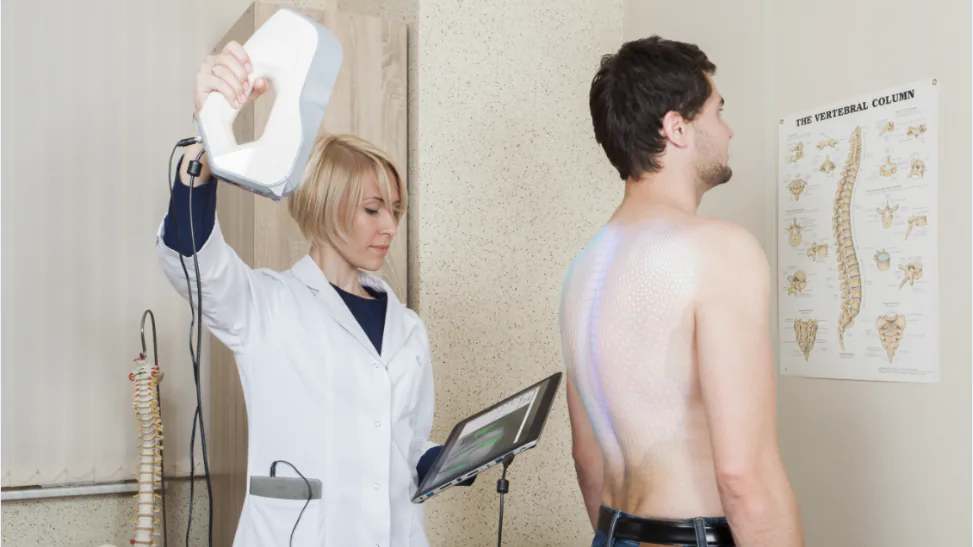
Clinician scanning a standing patient's back with the Artec Eva, with the scan shown on a tablet
Spinal and orthotic fitting work needs a quick, contact-free capture while the patient stands still.

White-light 3D scanner for people and patients

The Eva projects white structured light from a flash source instead of a laser, and Artec states this is safe for scanning people and animals. Artec lists medicine and prosthetics among the fields where it is used. Reconstruction at up to 16 frames per second keeps a back, limb or head scan short, which matters because the person has to hold still until capture ends; movement shows up as noise in the model.
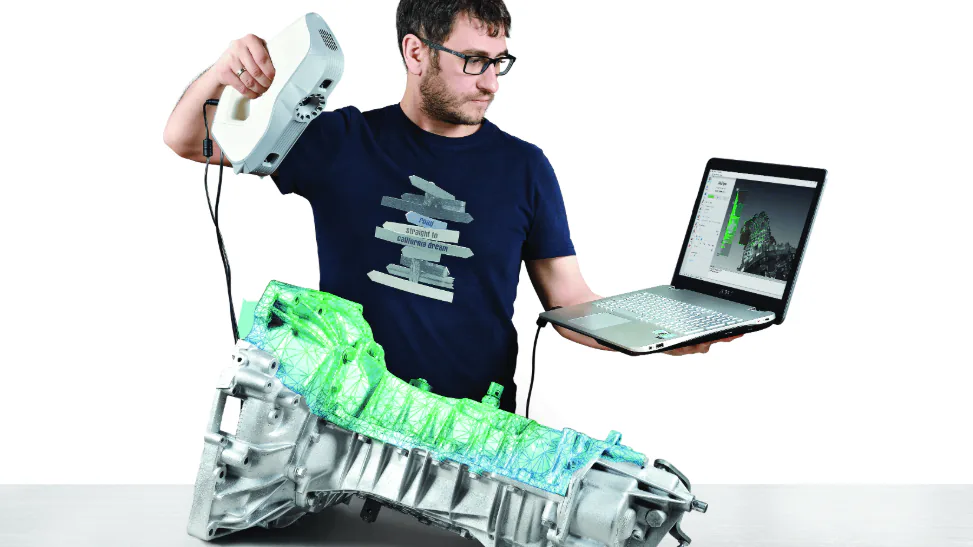
Man scanning a gearbox casing with the Artec Eva while holding a laptop, scan data overlaid in green on the part
Cast gearbox housings mix sharp edges with dark, rough faces, the areas HD Mode is meant to clean up.

HD Mode doubles resolution on difficult surfaces

HD Mode is an AI-based reconstruction mode in Artec Studio that doubles the resolution of standard SD data, reaching up to 0.2 mm on the Eva. It recovers thin features, sharp edges and black or shiny areas that SD processing tends to miss, which helps on castings such as this gearbox housing. HD processing asks more of the computer: the maker's minimum is an Intel Core i7 or i9 with 32 GB of RAM and an NVIDIA GPU.

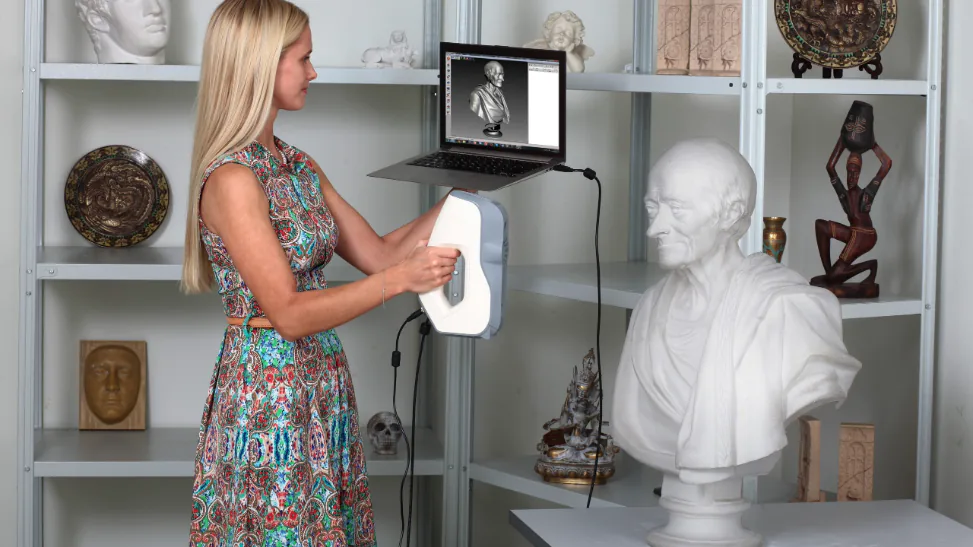
Woman scanning a white marble bust with the Artec Eva in a room of shelved sculptures, her laptop showing the model
A bust like this is scanned with nothing stuck to it, which matters when an object must not be touched.

Target-free tracking on geometry and color

The Eva follows its position using the object's shape and its color together, so you start scanning without stickers or a calibration step. That hybrid tracking holds on smooth, featureless surfaces where geometry alone loses its place, and it leaves sculptures, finished parts and museum pieces untouched. On a large, plain panel, targets can still be added when the job calls for them, and Eva data merges with other Artec scanners in Artec Studio.

What are the Artec Eva specifications?

Artec Eva specifications
3D point accuracyUp to 0.1 mm
3D accuracy over distanceUp to 0.1 mm + 0.3 mm/m
3D resolutionUp to 0.2 mm (HD mode)
Object sizeFrom 10 cm
Working distance0.4–1 m
Linear field of view (closest range)214 × 148 mm
Angular field of view30 × 21°
Volume capture zone61,000 cm³
3D reconstruction rateUp to 16 fps
Data acquisition speedUp to 18,000,000 points/s
Texture resolution1.3 MP, 24 bpp color
Light sourceFlashbulb (3D); white 12-LED array (2D)
Interface1 × USB 2.0, USB 3.0 compatible
Power sourceAC power or external battery pack
Artec battery pack run timeUp to 6 hours of power
Dimensions (H × D × W)262 × 158 × 63 mm
Weight0.9 kg
Output formatsMesh: OBJ, PLY, WRL, STL, AOP, ASC, PTEX, E57, XYZRGB; CAD: STEP, IGES, X_T; measurements: CSV, DXF, XML

Specs checked:

What is the Artec Eva used for?

  • Reverse engineering and prototyping

    Capture medium-sized parts quickly as meshes, then fit primitives or auto-surface them in Artec Studio for CAD.

  • Orthotics, prosthetics and medical devices

    Artec states its white light is safe for scanning people, and the fast capture keeps a scan short while the person holds a pose.

  • Quality inspection

    Compare a scanned mesh with CAD in Artec Studio to check form and fit on parts where 0.1 mm is enough.

  • CGI, heritage and forensics

    Full-color texture makes the Eva a common choice for digital assets, museum objects and scene evidence.

Industries

  • Manufacturing
  • Automotive
  • Healthcare
  • Heritage preservation
  • Forensics
  • CGI and media

What surfaces and part sizes does the Artec Eva handle?

The Eva suits objects from about 10 cm up, and Artec places it in the medium to large range, roughly 20 cm to 2 m. It works 0.4 to 1 m from the surface, with a field of view of 214 × 148 mm at the closest range and a 61,000 cm³ capture zone. Because it tracks color as well as shape, it can follow smooth, featureless surfaces that geometry-only tracking loses. The maker says it handles black and shiny surfaces, and HD mode improves results on thin elements and hard-to-reach areas. For bigger jobs, several Eva units can be synchronized, and Eva data merges with other Artec scanners in Artec Studio.

Part size
0.1–2 m
Positioning targets
Not needed
Color texture
Captured
Wireless
No

Compare sizes, materials and finishes across every scanner

What software does the Artec Eva use?

The Eva is driven by Artec Studio, which captures the scan and processes it on the connected computer. Autopilot mode walks new users through registration, fusion and texturing with automatic settings, while manual mode exposes every parameter. AI-based HD mode doubles resolution compared with standard SD data. From there you can fit CAD primitives, auto-surface the mesh, compare it with a CAD model, or export to SOLIDWORKS and Geomagic Design X. Export formats include OBJ, PLY, STL and E57 meshes and STEP, IGES and X_T CAD files. Artec Studio 20 runs on Windows 10 or 11, and the Artec Scanning SDK lets developers build the Eva into custom systems.

What comes with the Artec Eva?

The maker lists these items with the Artec Eva:

  • Artec Eva scanner
  • Two USB cables
  • Power supply
  • Power cable (EU, US or GB plug)
  • Manual

How does the Artec Eva compare?

Can I see the Artec Eva scan my own work?

Often, yes. Tell us you want to see the Artec Eva, and we will confirm whether we can show it at your location. Where we can, we bring the scanner to your facility and scan what you choose, so you see how it handles your surfaces, sizes and tolerances before you decide, instead of judging from a spec sheet. Pick the job that is hardest to measure today, such as a part with no CAD model or a shape you cannot measure by hand, and say what you need to check. On-site demos are available in most areas; ask when you request.

  1. Request a demo, name the model and tell us what you want scanned.
  2. We confirm whether we can show that model at your location.
  3. Where we can, we scan your own work and review the data with you.

What do buyers ask about the Artec Eva?

Does the Artec Eva need targets or calibration?

No. The Eva tracks its position using the shape and the color of the object together, so you can start scanning without placing targets or running a calibration. That hybrid tracking helps on objects with few geometric features, where color differences keep the scan aligned. Targets can still be added to the workflow when a job calls for them, for example on a large, smooth panel.

Is the Artec Eva safe for scanning people?

Artec states that it is. The Eva projects white structured light from a flash source, not a laser, and the maker says this is safe for scanning people and animals. For a clean result the subject needs to hold still for the whole scan, because movement creates noise in the model. The reconstruction rate of up to 16 frames per second keeps a typical head or limb scan short, which is one reason the Eva is used for orthotics, prosthetics and medical device fitting.

What is HD mode on the Artec Eva?

HD mode is an AI-based reconstruction mode in Artec Studio. It produces meshes with twice the resolution of standard SD data, reaching up to 0.2 mm, and recovers thin features, edges and black or shiny areas that SD data can miss. It is available for the Eva and Leo in Artec Studio 15.1 and later. HD processing needs more computing power: the maker's HD minimum is an Intel Core i7 or i9, 32 GB of RAM and an NVIDIA GPU with CUDA 6.0+ and at least 2 GB of VRAM.

Can the Artec Eva run without mains power?

Yes. The Eva runs on AC power or an external battery pack. The maker states that its battery pack provides up to 6 hours of power, and pairing the scanner with a tablet lets you scan where there is no outlet. The scanner itself connects over USB, so a computer or tablet must stay attached while you scan.

How does the Artec Eva compare with the Artec Leo?

Both have 0.1 mm point accuracy, 0.1 mm + 0.3 mm/m over distance and up to 0.2 mm resolution. The Eva is lighter at 0.9 kg and must be connected to a computer by USB. The Leo weighs 2.6 kg but is fully wireless, with a built-in screen, battery and processor, a larger 160,000 cm³ capture zone and up to 35 million points per second. Choose the Eva for lighter work near a computer, and the Leo when cables get in the way or objects are large.

How much does the Artec Eva cost?

The Eva keeps the quote simple. The scanner ships with two USB cables, a power supply and a manual, and it runs in Artec Studio, which covers capture, processing, scan-to-CAD tools and inspection maps. What changes the quote is where you will scan: an external battery pack and a tablet let it work away from an outlet, in a clinic or on location, and training gets your team scanning people or objects cleanly. If you model in Geomagic Design X or SOLIDWORKS, say so, since the export path shapes the software side. After a short conversation about your work, we quote the Eva setup that fits.

Request pricing on the Artec Eva

See the Artec Eva scan your own work

Tell us what you want scanned, and we will confirm whether we can show it at your location. On-site demos are available in most areas. You can also start with a pricing request.

Call (816) 608-7745