Skip to content
(816) 608-7745Get pricingBook a demo

Geomagic3D design software for organic shapes, with an optional haptic interface

Geomagic Freeform

3D design software for organic shapes that traditional CAD handles poorly, with sculpting tools and an optional haptic interface.

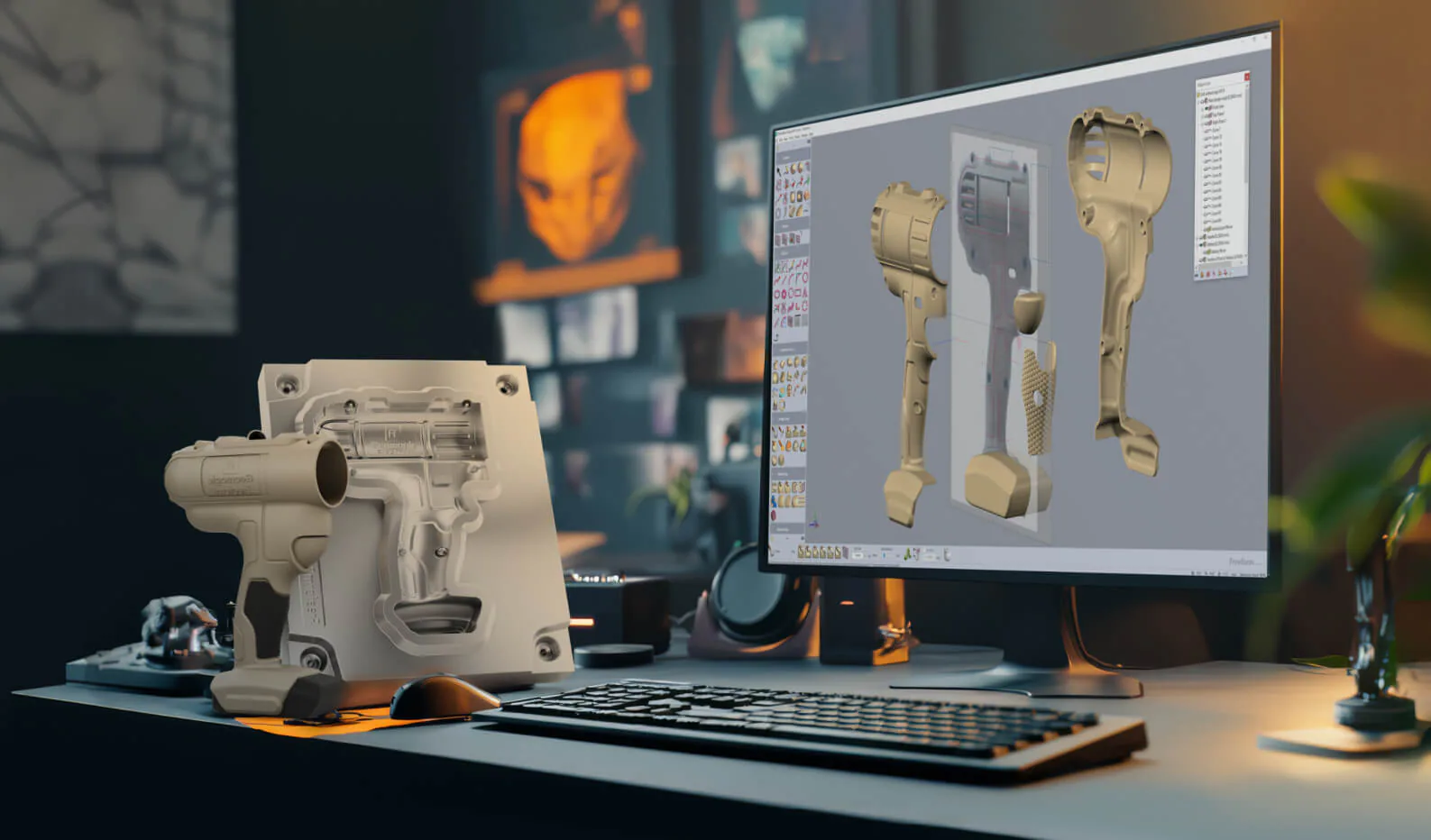
Cordless drill housing and a printed mold half on a desk, beside a monitor showing the housing split for molding in Freeform

Key takeaways

  • Freeform is built for organic, sculptural shapes that are hard to model in traditional CAD.
  • The maker describes its haptic interface as optional; it adds touch feedback while you sculpt.
  • Design-for-manufacture tools keep real-world dimensions and draft in the model.
  • It imports and exports standard industry formats and adds textures and lattices to a design.
  • Freeform runs on Windows PCs only, and the maker states that it is not a medical device.

What is Geomagic Freeform?

Geomagic Freeform is 3D design software for organic models: complex, sculptural forms that are hard to build in traditional CAD. Instead of only sketching and extruding, you shape virtual clay, combine it with mesh and surface tools, and keep real-world dimensions and draft so the design can be made. It starts from scan data or CAD and ends in 3D printing, machining or molding. Freeform runs on Windows PCs only, and its haptic interface is optional: the maker presents it as a way to model faster with touch feedback. Freeform is design software rather than scanning software, so pair it with a scanner when a design starts from a real object.

What can Geomagic Freeform do?

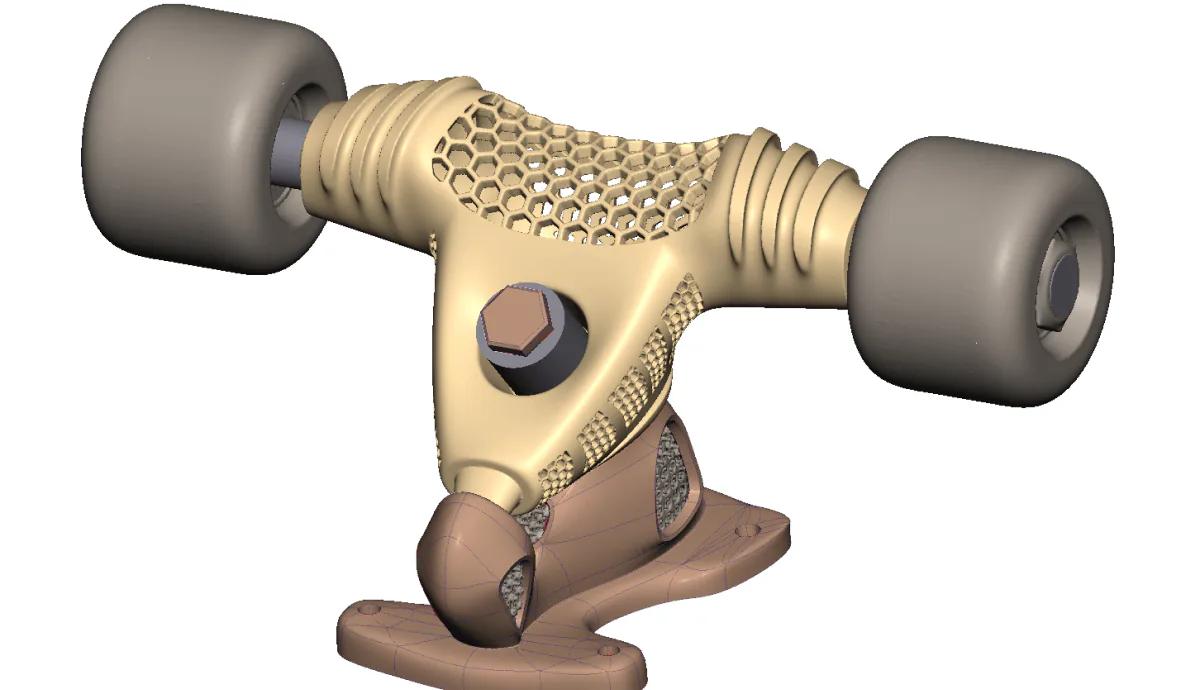
Skateboard truck designed in Freeform with a honeycomb lattice and textured ribs across its hanger
Lattices and textures run across the surface, detail that sketch-based CAD struggles to model.

Textures and lattices across organic surfaces

Freeform applies textures and lattices directly to an organic form, which is hard to do with sketches and features. A honeycomb can lighten a part or add grip, a ribbed pattern can change how it looks and feels, and the design still keeps real-world dimensions. The finished model goes straight to 3D printing, where lattices like these are practical to make.
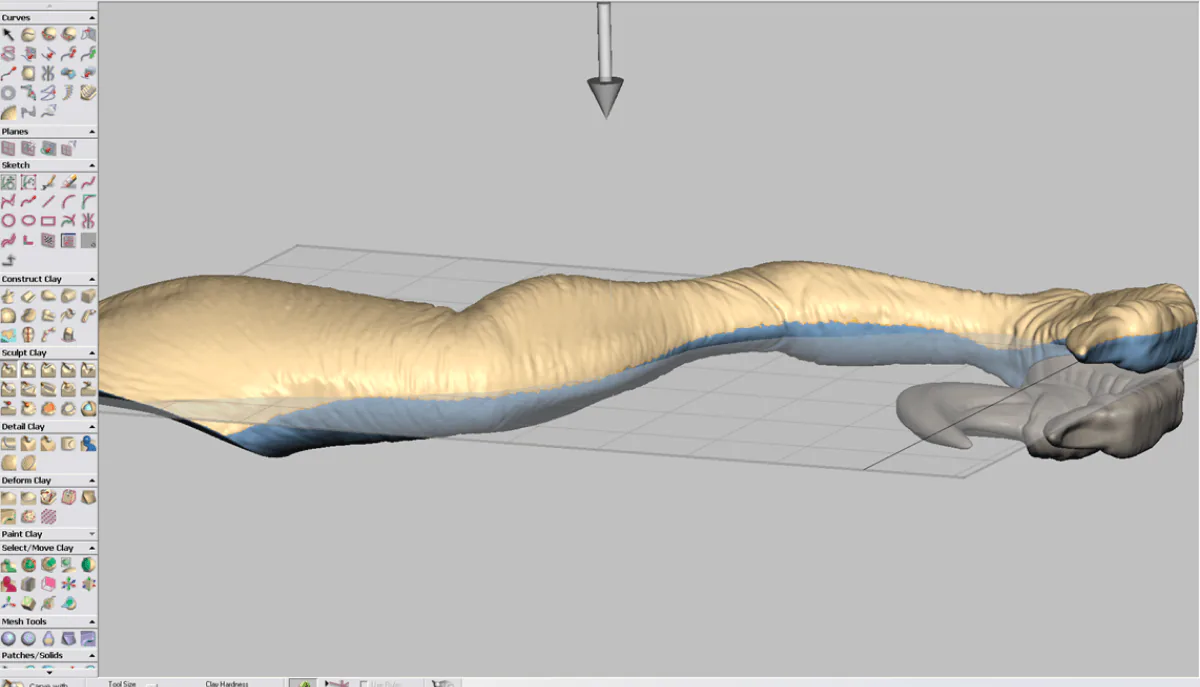
Freeform clay tools beside a long organic shell, with a pull-direction arrow above it for a draft check
The arrow above the shell marks the direction a mold would pull, the basis for checking draft.

Design for manufacture with dimensions and draft

Organic does not have to mean impossible to make. Freeform keeps real-world dimensions throughout, and its design-for-manufacture tools check and add draft so a shape can come out of a mold. Clay, curve, sketch and plane tools sit side by side, so you can sculpt freely and still place exact geometry where a part must mate with something else. The design goes on to 3D printing, machining or molding.

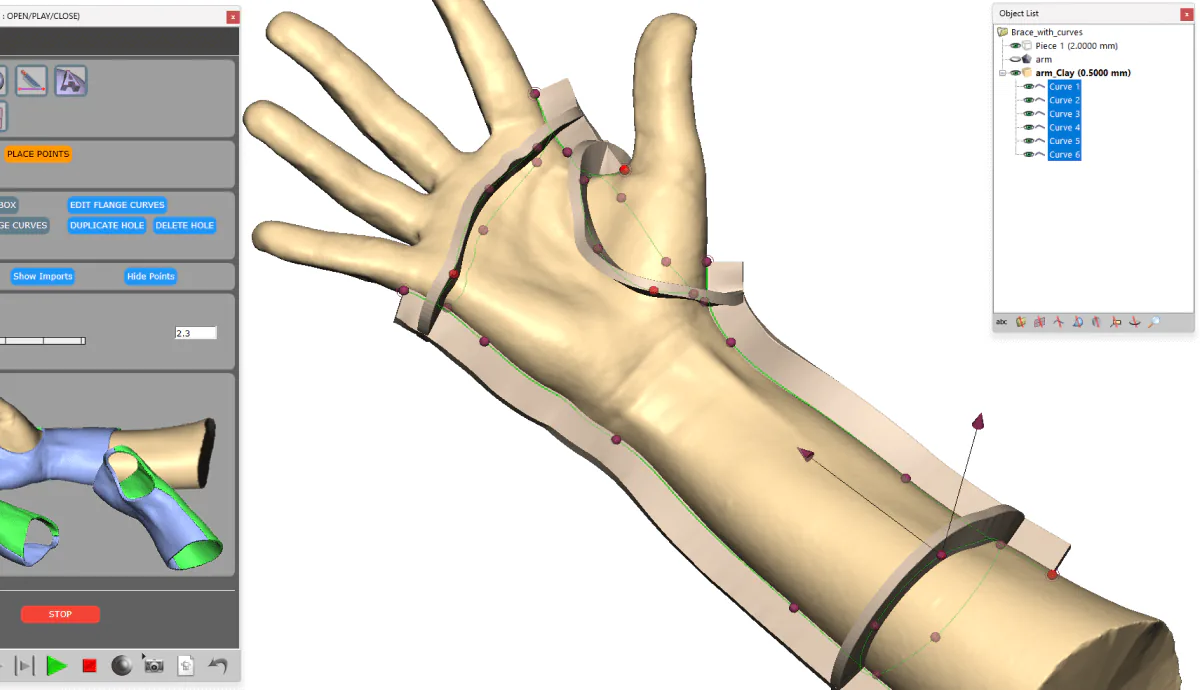
Freeform automation panel placing points and flange curves for a wrist brace on a scanned hand and forearm
A guided routine walks through placing the brace outline on the arm, step by step.

Flexible automation for repeat designs

Repeat designs, such as braces fitted to each patient's arm, follow the same steps every time. Freeform's automation tools turn those steps into guided routines with their own buttons and prompts, and scripting covers jobs a routine does not. A designer then spends time on the decisions that change from one design to the next, while the routine handles the repetitive placement and modeling.

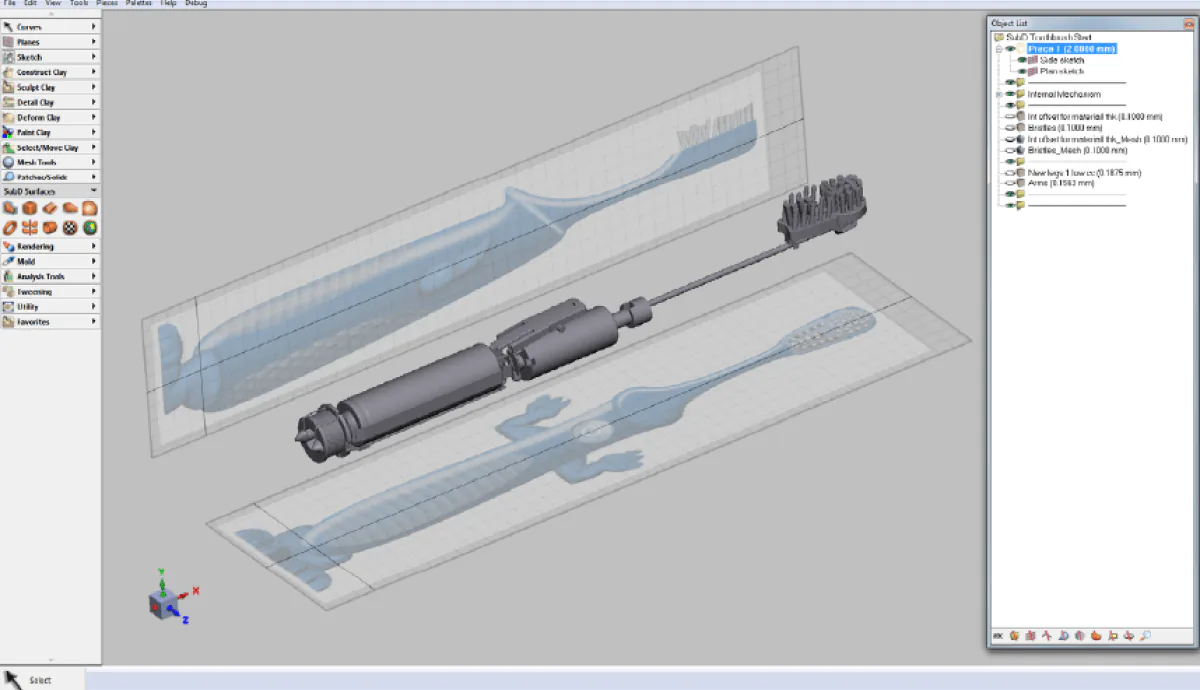
Freeform model of an electric toothbrush with its internal motor and drive shaft between two sketch planes
The outer shape and the parts inside it are designed together, in one model.

Workflow integration from scan to production

Freeform fits into the rest of your workflow at both ends. It imports and exports the standard industry formats, so scan data and CAD models come in, and finished designs go out to additive, subtractive or hybrid manufacturing. Parts modeled in CAD can sit inside the sculpted shell, as in this toothbrush, so the organic surface is designed around the mechanism it has to hold.

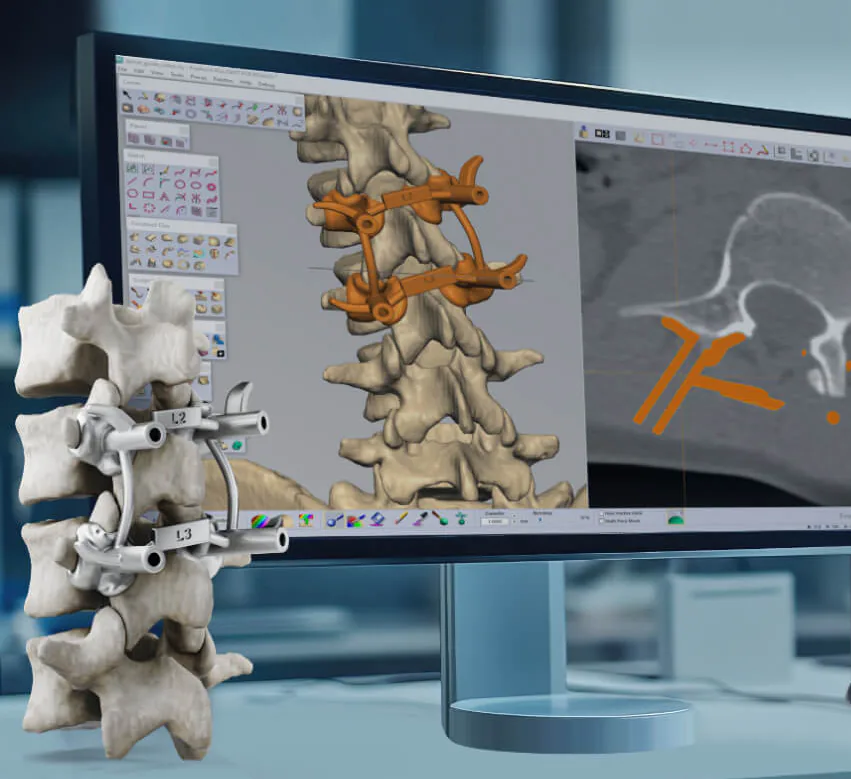
Spinal implant designed in Freeform on a vertebra model, with a CT slice beside the 3D view on screen
Design and medical image sit side by side, so the implant is shaped to the anatomy.

Healthcare design around patient data

Healthcare teams use Freeform to design around scan, CT and MRI data: orthotics, prostheses, cranial plates and patient-matched shapes. The organic tools follow anatomy that sketch-based CAD finds awkward, and real-world dimensions keep the result manufacturable. The maker is clear that Freeform is not a medical device and is not intended for treatment, planning or diagnosis, so clinical decisions stay inside your own regulated process.

Industrial design and mold making

For industrial design and mold making, Freeform shapes styled housings, grips and textured surfaces, then helps prepare them for production. Draft control and textures apply directly to the organic form, and the larger packages add CAD-style surfaces and solids and mold-tooling design. The result is a product that looks sculpted and still comes out of a tool cleanly, as the drill housing and its mold half show at the top of this page.

An optional haptic interface

Freeform can be driven with a haptic device that pushes back as you sculpt, so you feel the virtual clay the way a modeler feels real clay. The maker describes this interface as optional and says it helps you model faster; standard mouse navigation works as well. If you are weighing a haptic device, our specialists can talk through with you whether it suits your designers when you request a demo.

What are the key facts about Geomagic Freeform?

Geomagic Freeform key facts
Software type3D design software for organic models
Haptic interfaceOptional
Design for manufactureReal-world dimensions and draft
ModelingUnconstrained modeling of organic, sculptural forms
Textures and latticesIncluded
AutomationFlexible automation tools
File exchangeImports and exports standard industry formats
Runs onWindows PCs only
Medical statusNot a medical device; not intended for treatment, planning or diagnosis

Specs checked:

What is Geomagic Freeform used for?

  • Orthotics and prostheses

    Shape braces, sockets and other body-matched designs around a scan of the patient, inside your own regulated process.

  • Molds and tooling

    Add draft to complex organic products and prepare them for mold making.

  • Consumer products

    Sculpt handles, grips, toys and styled housings, then check that they can be made.

  • Textures and lattices

    Apply a texture or a lattice across a surface for grip, weight or appearance before the design goes to 3D printing.

  • Redesign from a scan

    Start from a scan of an existing object and reshape it, instead of modeling it again from nothing.

Industries

  • Medical and orthotics
  • Consumer products
  • Tooling and molds
  • Additive manufacturing
  • Art and entertainment

What parts and surfaces can Geomagic Freeform handle?

Freeform is not limited to parts. It works on any organic form you can model or scan: a limb for an orthotic, a spine for an implant study, a sculpture, a toy, a grip or a styled housing. Clay tools shape it like a physical model, mesh and surface tools refine it, and design-for-manufacture tools keep real-world dimensions and draft so that a mold or a machine can produce it. Textures and lattices can be laid across a surface for grip, weight or looks. The size you work at depends on the data you bring in and on how the result will be made.

What does Geomagic Freeform work with?

Freeform sits between the data you start from and the process that makes the result. It imports and exports the standard industry formats, so scans from Creaform, Artec or other scanners come in as meshes, and finished designs go out to 3D printing, machining or molding. Flexible automation tools, scripting included, repeat routine design steps. Freeform is design software, not scan software: to clean a scan first, Geomagic Wrap handles meshes and surfaces, and when you need an editable CAD model of an existing part, Geomagic Design X is the tool. The haptic interface is optional, and Freeform runs on Windows PCs only.

How does Geomagic Freeform compare?

Can I see Geomagic Freeform work on my own scans?

Often, yes. Tell us you want to see Geomagic Freeform, and we will confirm whether we can show it at your location. Where we can, our specialist runs it on scans of your own work, so you see how it fits your workflow, from raw scan data to the result you need, before you decide. Pick something you measure often, or a part that has no CAD model, and say what you need to check, rebuild or deliver. On-site demos are available in most areas; ask when you request.

  1. Request a demo and tell us what you scan and which results matter to you.
  2. Where we can show the software at your location, our specialist runs it on scans of that work.
  3. You review the results with us and talk through how it fits your workflow.

What do buyers ask about Geomagic Freeform?

Do I need a haptic device to use Geomagic Freeform?

No. The maker describes Freeform's haptic interface as optional. It gives tactile feedback, so you can feel the virtual clay while you sculpt, and the maker presents it as a way to model faster on detailed organic work. Freeform also works with standard mouse navigation. If you are weighing a haptic device, say so when you request a demo, and we will talk through whether it suits the way your team designs.

What is the difference between Freeform and Design X?

Design X turns a scan of an existing part into feature-based, editable CAD. Freeform designs new organic forms that would be hard to build with sketches and features, often starting from a scan: braces, sockets, sculptures and styled products. If your job is to rebuild what already exists, start with Design X; if it is to create a new shape that fits or grows from it, Freeform is the tool. Both read standard scan data.

Can Freeform use scan and medical image data?

Yes. Freeform works with 3D scan data and CAD models, and healthcare teams use it to design around CT and MRI data for orthotics, prostheses and cranial plates. The maker states that Freeform is not a medical device and is not intended for treatment, planning or diagnosis, so clinical decisions stay with your own regulated process.

Is Geomagic Freeform scanning software?

No. Freeform is design software. It does not run a scanner; it takes the scan data a scanner produces and turns it into a new design. That is why it often sits beside a scanner and a scan-processing tool: the scanner captures the object, Geomagic Wrap or the scanner's own software cleans the mesh, and Freeform shapes the product. We show it with scans of your own work, so you see the whole path.

Does Geomagic Freeform run on a Mac?

No. The maker states that Freeform only works on Windows PCs. If your designers use Macs, plan a Windows workstation for Freeform, sized for the scan and mesh data you work with, and ask us about the setup when you request a quote. The same Windows machine can also run Geomagic Wrap or Design X if you add them later.

How much does Geomagic Freeform cost?

Freeform is sold in more than one package, so the quote depends on the tools you need, from sculpting alone to surfaces, solids and mold design, and on whether you add a haptic device. We also include training for your designers. Tell us what you design, what data you start from and how the result will be made, and we quote the package and setup that fit.

Request pricing on Geomagic Freeform

See Geomagic Freeform work on your own scans

Our specialists can show it on scans of your own work, at your facility. On-site demos are available in most areas; ask when you request. You can also start with a pricing request.

Call (816) 608-7745